tencent cloud

Chat

제품 소개
제품 개요
Basic Concepts
응용 시나리오
기능 소개
계정 시스템
사용자 정보 및 관계망
메시지 관리
그룹 시스템
Official Account
Audio/Video Call
사용 제한
구매 가이드
과금 개요
요금 안내
Purchase Instructions
Renewal Guide
연체 안내
Refund Policy
다운로드 센터
SDK & Demo 소스 코드
업데이트 로그
시나리오 솔루션
Live Streaming Setup Guide
AI Chatbot
대규모 엔터테인먼트 협업 커뮤니티
Discord 구현 가이드
IM을 게임에 통합하는 방법
WhatsApp Channel-style Official Account Integration Solution
Send Red Packet
Firewall Restrictions
클라이언트 APIs
SDK API(Web)
Android
iOS & macOS
Swift
Flutter
Electron
Unity
React Native
C APIs
C++
서버 APIs
Secure authentication with UserSig
RESTful APIs
Webhooks
콘솔 가이드
New Console Introduction
애플리케이션 생성 및 업그레이드
기본 설정
기능 설정
계정 관리
그룹 관리
Official Channel Management
콜백 설정
모니터링 대시보드
Viewing Guide for Resource Packages
Real-Time Monitor
개발 보조 툴
액세스 관리
Advanced Features
FAQ
uni-app FAQs
구매
SDK 관련 질문
계정 인증
사용자 정보 및 관계망
메시지
그룹
라이브 방송 그룹
닉네임 및 프로필 사진
협약 및 인증
Service Level Agreement
컴플라이언스 인증
IM 정책
개인 정보 보호 정책
데이터 개인 정보 보호 및 보안 계약
에러 코드
문의하기
문서Chat

uni-app

포커스 모드
폰트 크기
마지막 업데이트 시간: 2024-12-30 16:16:11

API Overview

API
Description
registerPush
Register for push service (must be called after the App user agrees to the Privacy Policy to use the push service).
unRegisterPush
Unregister to disable push service.
setRegistrationID
Set Push Device ID.
RegistrationID is the unique identification ID of the push receiving device. By default, this ID is automatically generated when the push service is successfully registered, but you can also set it manually. Note! If you call this API, make sure to call it before registerPush.
Use cases:
If you have integrated both the Chat message service and the Push service on a device, and the user login Chat userID is assumed to be "user123", if you want to push messages to "user123", you need to call this interface to set the device identification ID as follows:
Push.setRegistrationID("user123", () => {});
getRegistrationID
After successfully registering the push service, you can call this interface to obtain the unique identification ID of the push receiving device, which is the RegistrationID.
getNotificationExtInfo
Upon receiving offline push notifications, click the notification bar to pull up the App, and call this interface to get the push extension information.
addPushListener
Add a Push listener.
removePushListener
Remove a Push listener.
disablePostNotificationInForeground
When the app is in the foreground, turn on/off notification bar notifications (default is on).
createNotificationChannel
Create a client notification channel. This API can implement custom ringtone feature on the Android platform.

Interface details

Registering Push Service

API

registerPush(SDKAppID, appKey, onSuccess, onError)

Parameter description:

Parameters
Type
Description
Access Path
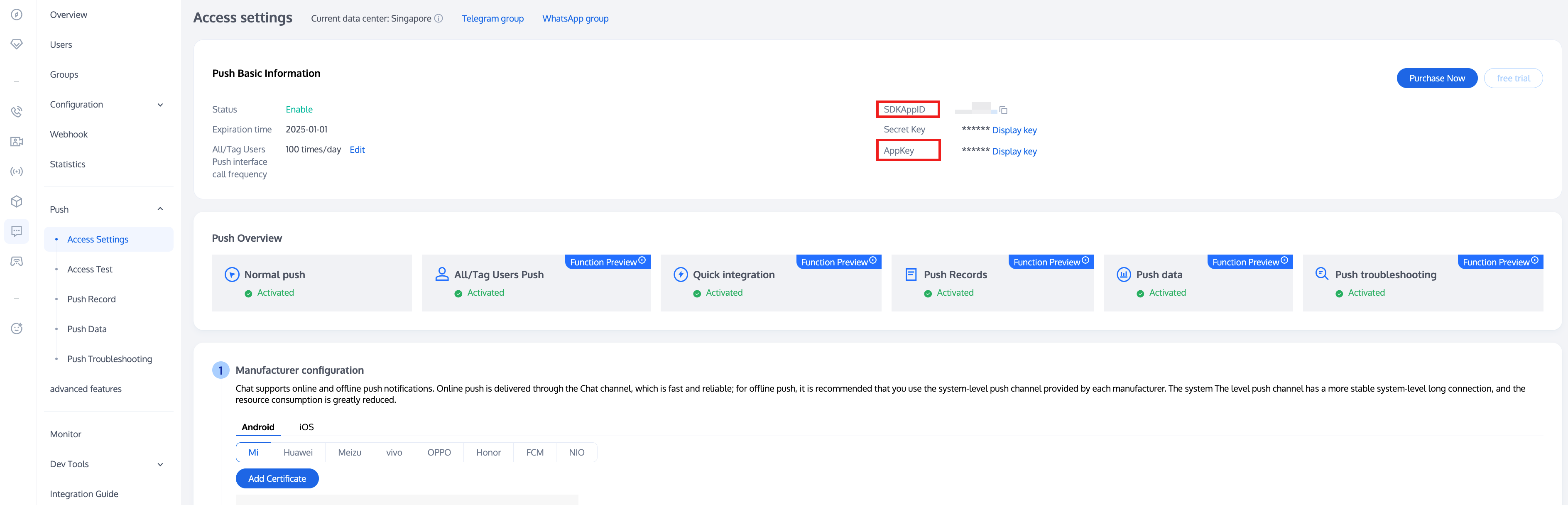
SDKAppID
Number
SDKAppID for Push Service Push.


appKey
String
Client key for Push Service Push.
onSuccess
Function
Callback for successful push registration.
-
onError
Function |undefined
Callback for failed push registration.
-

Unregister to disable push service

API

unRegisterPush(onSuccess, onError)

Parameter description:

Parameters
Type
Description
onSuccess
Function
Callback for successful push unregistration.
onError
Function |undefined
Callback for failed push unregistration.

Set push ID identifier RegistrationID

Note:
1. If you call this API, make sure to call it before registerPush.

API

setRegistrationID(registrationID, onSuccess)

Parameter description:

Parameters
Type
Description
registrationID
String
Customized push ID identifier.
onSuccess
Function
Callback after successfully setting the customized push ID identifier.

Get push ID identifier RegistrationID

Note:
1. If you have called the setRegistrationID interface to set the identifier ID, this interface will return the identifier ID you set, otherwise, it will return a random value generated by the Push SDK.

API

getRegistrationID(onSuccess)

Parameter description:

Parameters
Type
Description
onSuccess
Function
Callback for successfully obtaining the push ID.

Getting Push Extension Information

API

getNotificationExtInfo(onSuccess)

Parameter description:

Parameters
Type
Description
onSuccess
Function
Callback for successfully getting the clicked pass-through content.

Adding a Push Listener

API

addPushListener(eventName: string, listener: (data: any) => void);

Parameter description:

Parameters
Type
Description
eventName
String
Push Event Type.
listener
Function
Push Event Handling Method.

Removing a Push Listener

API

removePushListener(eventName: string, listener?: (data: any) => void);

Parameter description:

Parameters
Type
Description
eventName
String
Push Event Type.
listener
Function | undefined
Push Event Handling Method.

Turning On/Off Notification Bar Notifications When the App is in the Foreground

API

disablePostNotificationInForeground(disable: boolean);

Parameter description:

Parameters
Type
Description
disable
boolean
Turning On/Off Notification Bar Notifications When the App is in the Foreground, Default On:
true: Turning off notification bar notifications when the app is in the foreground
false: Turning on notification bar notifications when the app is in the foreground

Creating a Client Notification Channel

API

createNotificationChannel(options: any, listener: (data: any) => void);

Parameter description:

Parameters
Type
Description
options.channelID
String
The ID of the custom channel.
OPPO: The channelID in Console -> Access Configuration.
options.channelName
String
The name of the custom channel.
options.channelDesc
String | undefined
The description of the custom channel.
options.channelSound
String | undefined
The alert tone of the custom channel, audio file name without suffix. The audio file needs to be placed in xxx/nativeResources/android/res/raw.
For example:
options.channelSound = private_ring, which sets xxx/nativeResources/android/res/raw/private_ring.mp3 as the custom alert tone.
listener
Function
Callback function for successful API invocation.


도움말 및 지원

문제 해결에 도움이 되었나요?

피드백