This document provides best practices for implementing the Red Packet feature in Tencent Cloud Chat (IM). The Red Packet feature supports two primary scenarios:
One-on-One Red Packet: Send a red packet to a single user within a C2C Chat.
Group Red Packet: Send a red packet in a group chat, allowing multiple members to claim a share of the packet.
The solution leverages Chat Custom Messages, Message Modification, and Message Extension Data, and integrates with an external Payment System and Red Packet System to support the end-to-end workflow: sending, claiming, status synchronization, and notifications.
Overall Architecture
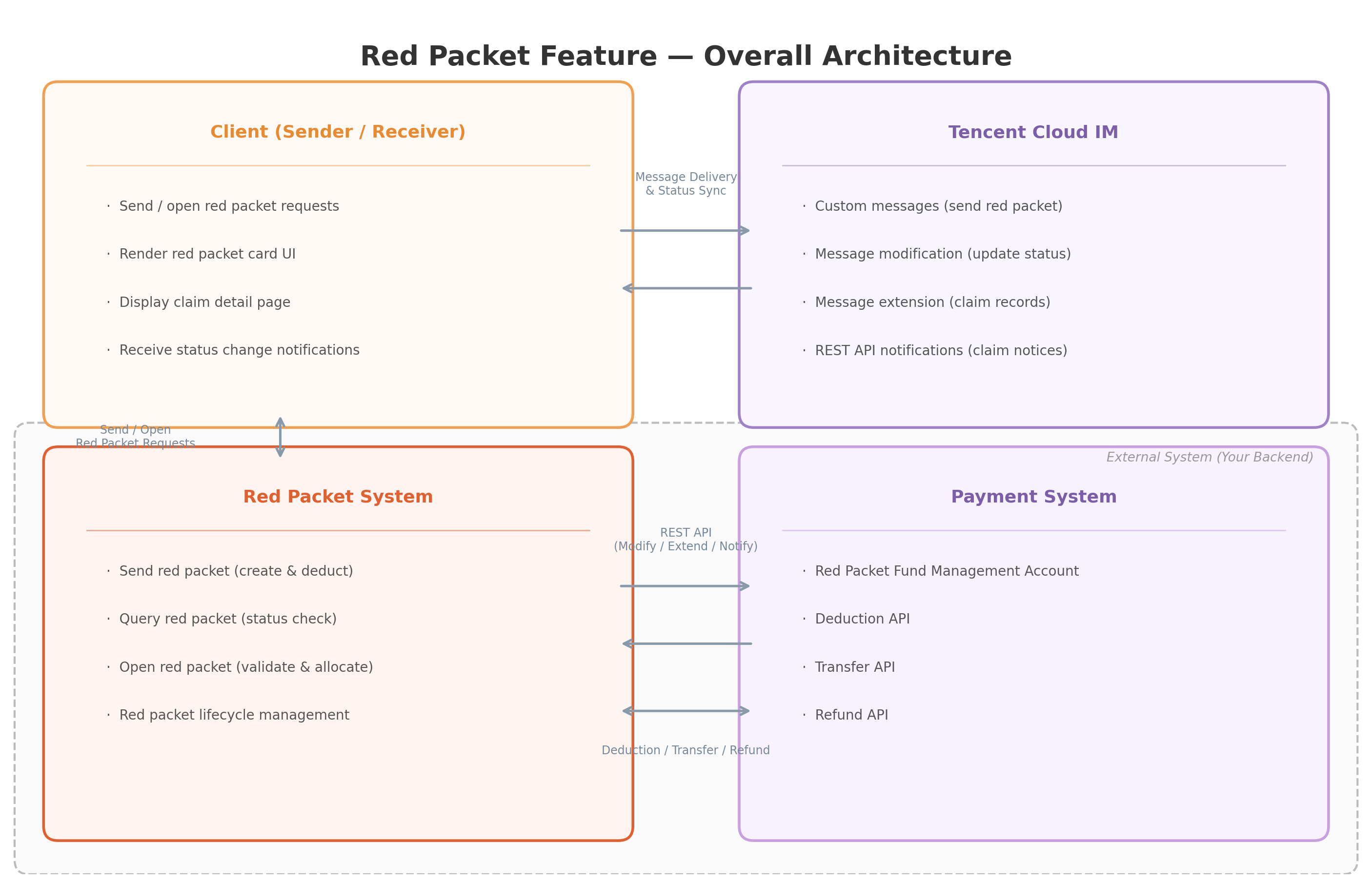
The system architecture includes four main components:
Component Responsibilities:
Component
Responsibility
Client (Sender/Receiver)
Initiates send/claim requests for red packets; displays red packet card UI.
Manages red packet lifecycle: creation, validation, opening, amount calculation.
Payment System
Handles funds: deduction, transfer, and refund operations.
Core Concepts and Data Structures
1. Custom Message Fields
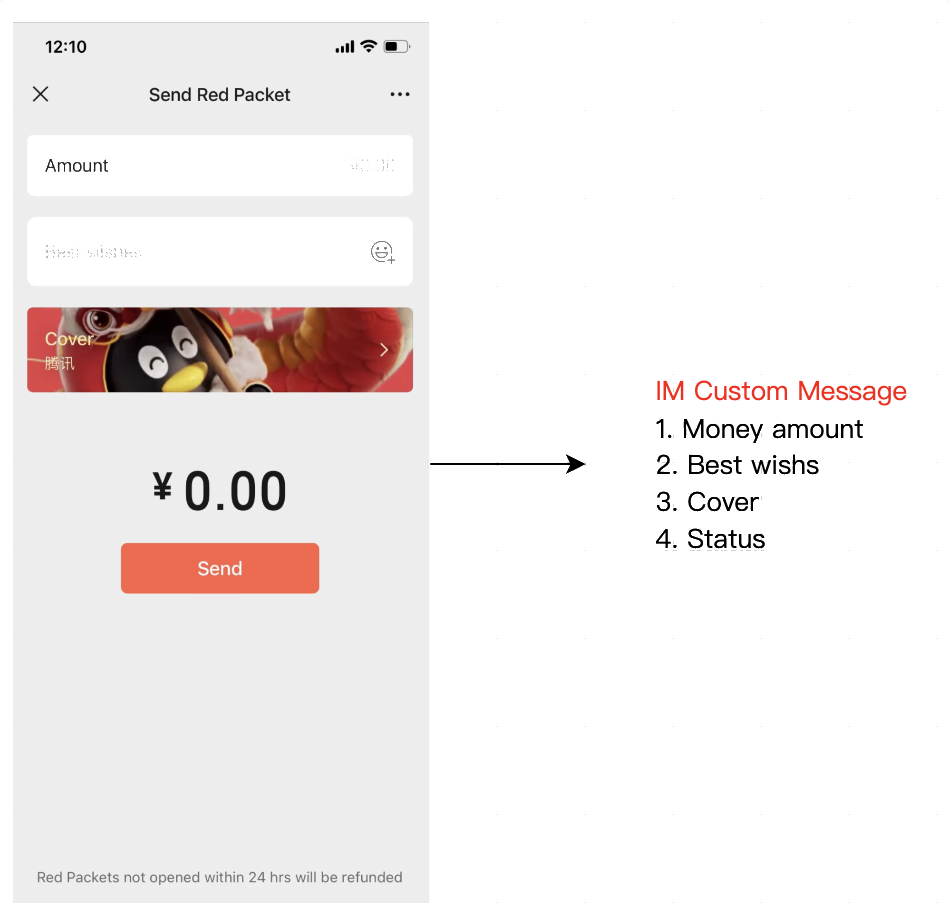
Red packets are implemented as Chat Custom Messages. The payload includes the following fields:
Field
Type
Description
BusinessID
String
Message type identifier. Always set to "red_packet" for red packet messages.
packet_id
String
Unique identifier generated by the red packet system after a successful deduction. Written into the custom message payload via REST API to bind the Chat message to the red packet.
money_amount
Number
Red packet amount (used for one-on-one red packets).
best_wishes
String
Greeting message, for example: "Wishing you prosperity and good luck."
cover
String
URL for the red packet cover image.
status
String
Red packet status:
"Unopened" (not claimed)
"Opened"(claimed / partially claimed)
"None left" (fully claimed)
quantity
Number
(Group red packet only) Number of red packets available.
total
Number
(Group red packet only) Total amount across all red packets.
random_amount
Boolean
(Group red packet only) Indicates whether the red packet uses random amounts ("Luckiest Draw" mode).
The client reads message extension data to display the claim list on the red packet details page, including claimant, amount, and time.
3. Message Modification and Message Extension
The red packet workflow relies on two core Chat features: Message Modification and Message Extension. Together, they enable real-time synchronization of red packet status and distributed storage of claim records.
Message Modification
Message Modification allows the server to update the message content (MsgBody) after it has been sent. In the red packet scenario, this is used to update the status field on the red packet card (e.g., transitioning from "Unopened" to "Opened" or "None left"), ensuring all clients see the latest status.
C2C Message Modification: Use Modify C2C Message REST API, locate messages by From_Account + To_Account + MsgKey.
Message Extension lets you attach key-value data to sent messages without altering the original content. In the red packet scenario, each user's claim record is stored as key = userID, value = amount,timestamp. Extensions are synchronized to all clients in real time.
To enable message extension data, set SupportMessageExtension to 1 when sending the message.
Capability
Use Case (Red Packet Scenario)
C2C Locating Parameters
Group Locating Parameters
Message Modification
Update red packet status (Unopened → Opened → None left)
From_Account + To_Account + MsgKey
GroupId + MsgSeq
Message Extension
Store claim records (key=userID, value=amount,timestamp)
From_Account + To_Account + MsgKey
GroupId + MsgSeq
Why use the REST API instead of a client API?
1. Avoid "paid but not sent": Sending a red packet includes a payment step. Your client should not deduct funds and then try to send the Chat message on its own.
If the client sends the message, delivery depends on the client's network/app state. You can end up with funds deducted but no message delivered.
If the server sends via REST API, you can keep the workflow consistent and recoverable: deduct funds → create packet_id → send message → persist the returned MsgKey / MsgSeq. If sending fails, you can retry (idempotently) or refund/rollback according to your business rules.
2. Race-free status updates: Claiming is highly concurrent. If multiple clients modify the same message, ordering is not guaranteed. For example, one request may set "None left" first and a later request may overwrite it back to "Opened". Server-side serialization ensures strict, irreversible state transitions ("Unopened" → "Opened" → "None left").
3. Single source of truth: The message status field is for UI display only and should be treated as untrusted. The red packet system is the source of truth for claimability, remaining amount, expiration, etc. When a user taps a red packet, the client should query the red packet system using packet_id and render based on the latest response. The message status is a best-effort snapshot.
One-on-One Red Packet
1. Sending a Red Packet
The sender taps the red packet entry in chat, enters the amount and greeting message, and optionally selects a cover image. These fields map directly to the custom message payload.
Implementation Steps
1. Client collects red packet details: amount, greeting message, and optional cover image.
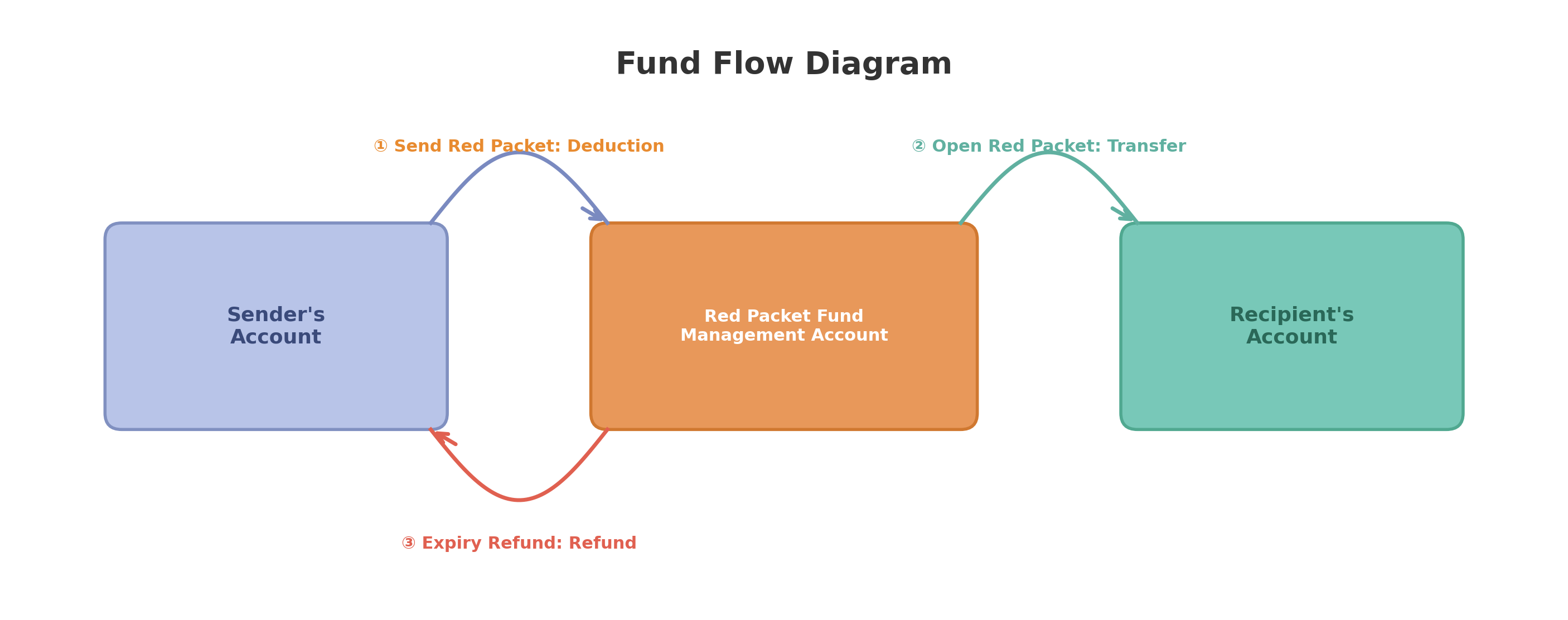
2. Red Packet System calls the Payment System Deduction API to deduct funds from the sender and transfer them to the Packet Fund Management Account.
3. After the deduction succeeds, the Red Packet System generates a unique packet_id.
4. The Red Packet System server sends the red packet as a Custom Message to the receiver, using Send C2C Message REST API, with From_Account set to the sender user ID. This guarantees the message is sent only after funds are deducted.
Example request:
// POST https://console.tim.qq.com/v4/openim/sendmsg
{
"SyncOtherMachine":1,
"From_Account":"sender_userid",
"To_Account":"receiver_userid",
"MsgRandom":1287657,
"MsgBody":[
{
"MsgType":"TIMCustomElem",
"MsgContent":{
"Data":"{\\"BusinessID\\":\\"red_packet\\",\\"money_amount\\":1.00,\\"best_wishes\\":\\"Happy New Year!\\",\\"cover\\":\\"https://example.com/cover.png\\",\\"status\\":\\"Unopened\\",\\"packet_id\\":\\"rp_20260301_abc123\\"}"
}
}
],
"SupportMessageExtension":1
}
2. Red Packet Card Display in Chat
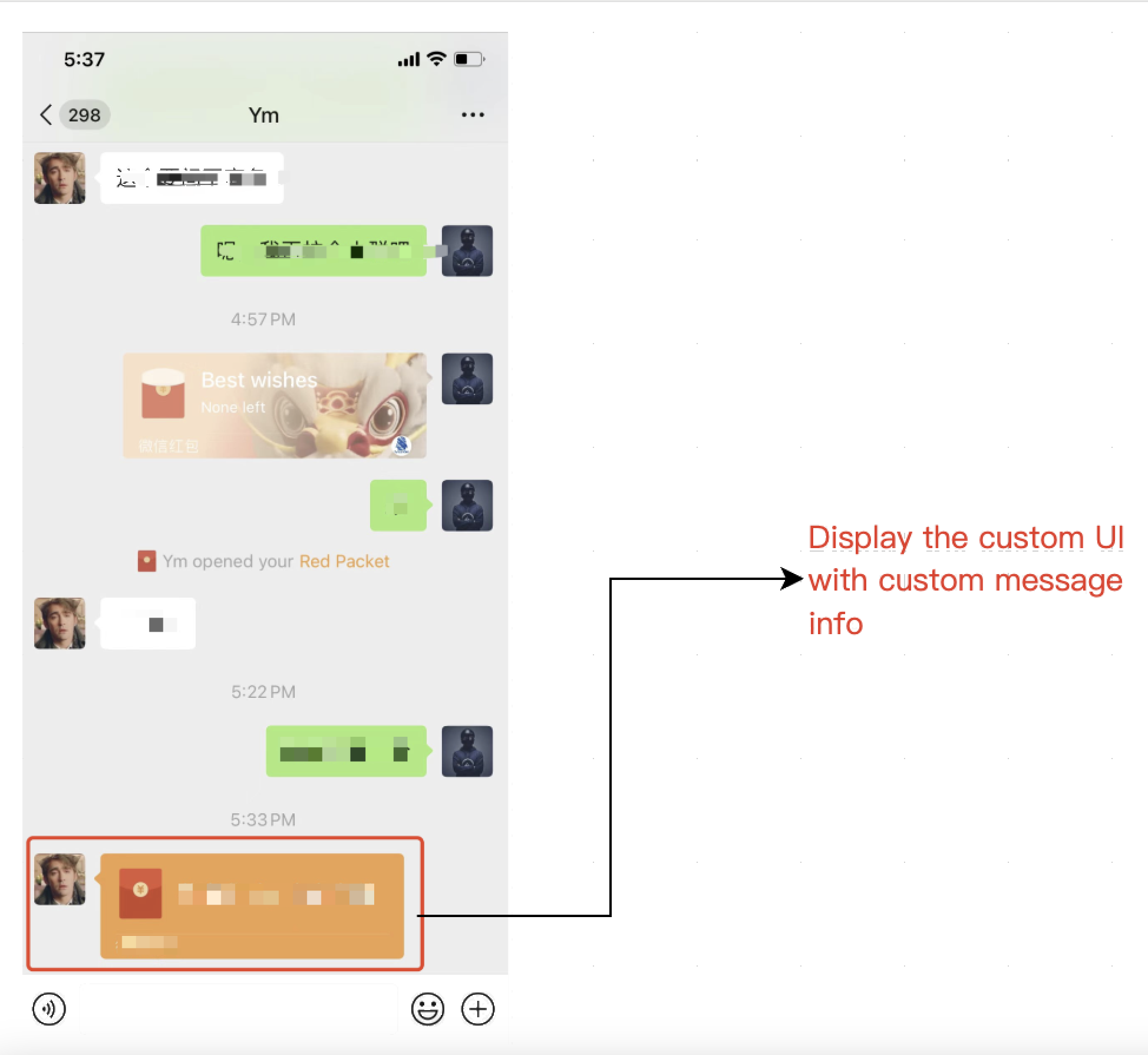
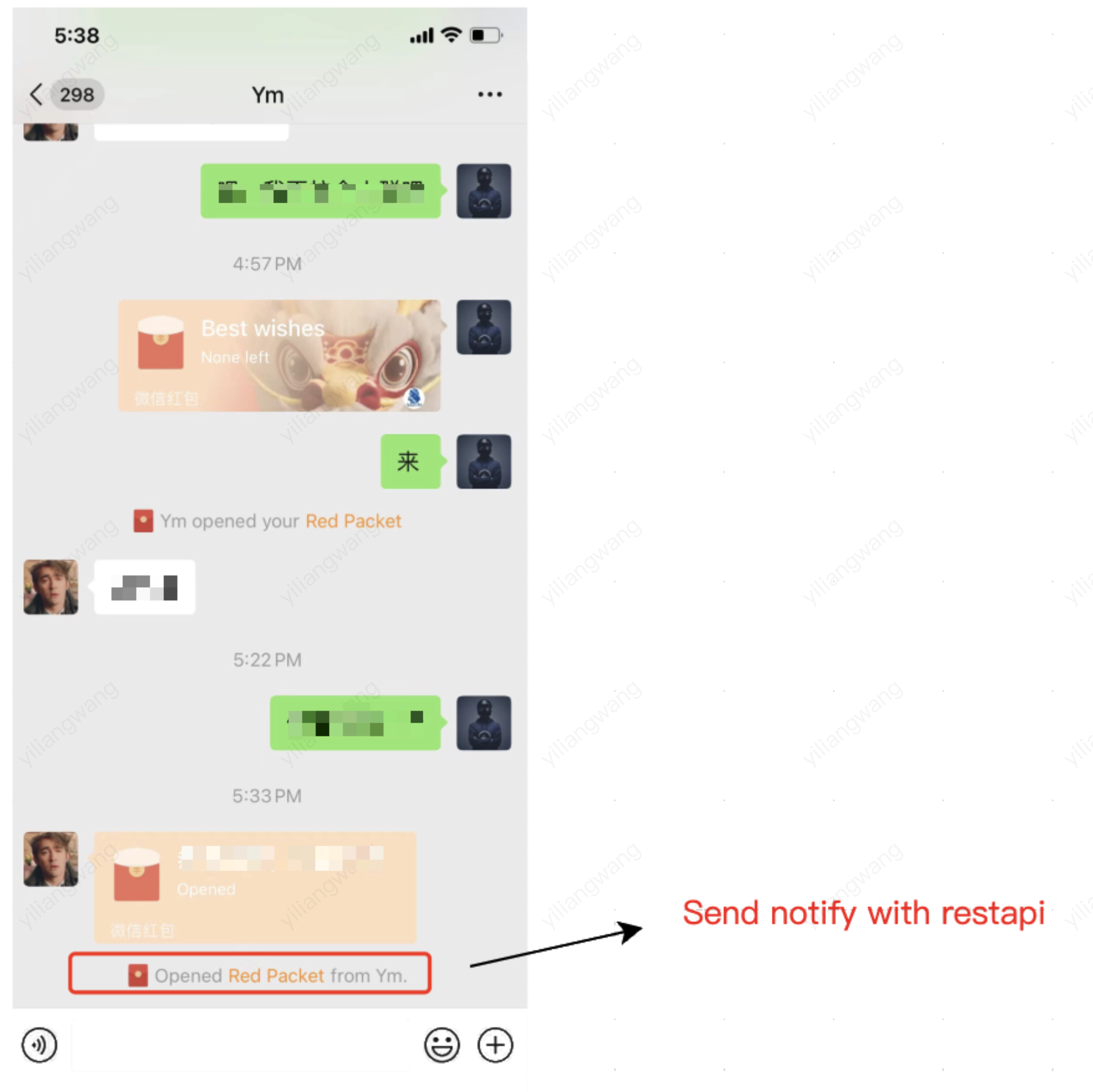
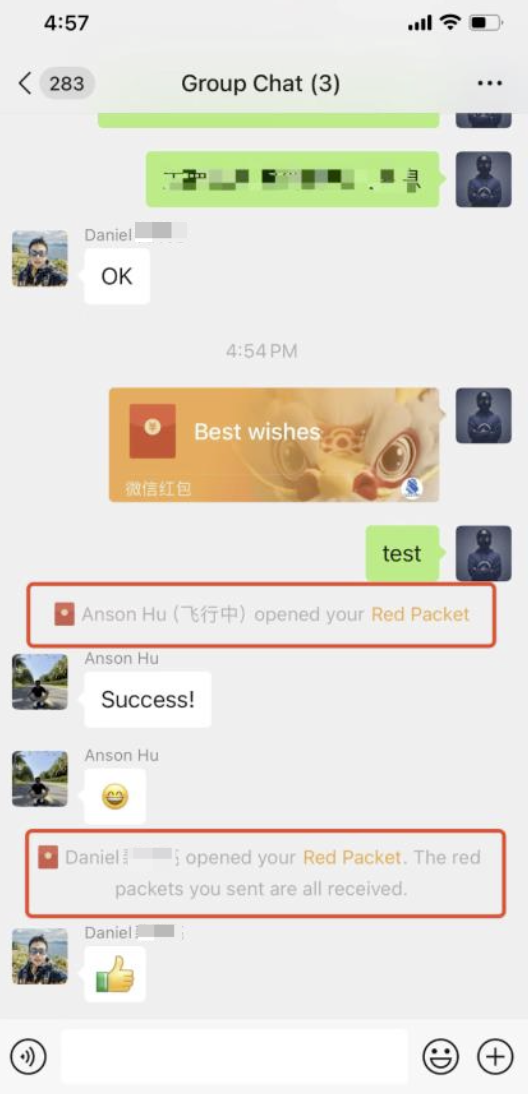
The red packet appears as a custom card in the chat list. The receiver can tap the card to claim the red packet. After claiming, a notification appears in the chat.
3. Opening a Red Packet
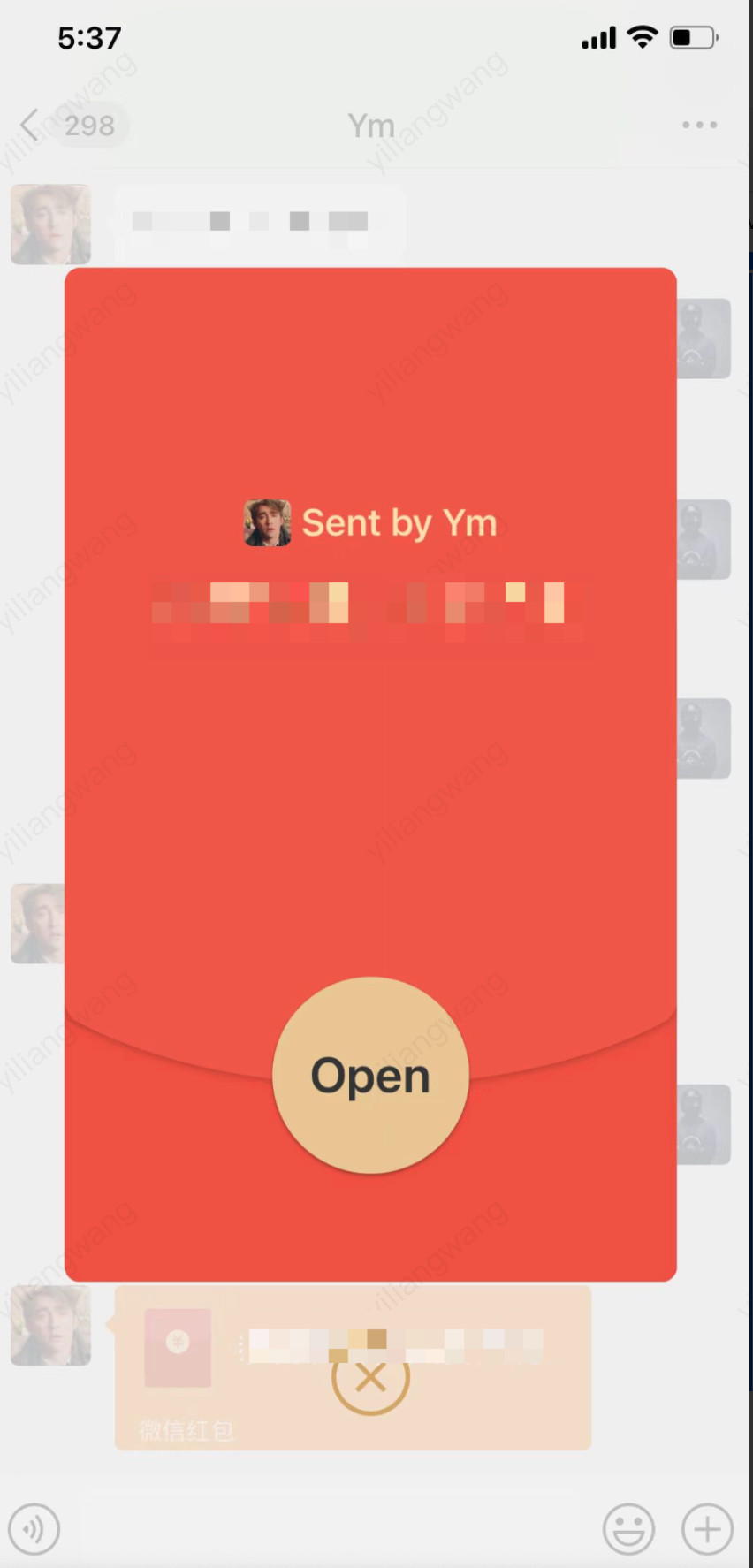
The receiver taps the red packet card to open a details screen showing sender information, the greeting message, and an Open button.
Implementation Steps
1. Receiver taps the red packet card and then taps Open.
2. Red Packet System validates the red packet status (already claimed, expired, etc.).
3. If valid, the Red Packet System calls the Payment System Transfer API to transfer the amount from the Packet Fund Management Account to the receiver.
4.
After a successful transfer, the Red Packet System server performs these actions (all via REST API for security):
Save claim record: The server writes the claim via Set Message Extension REST API, key = userID, value = amount,timestamp.
"Data":"{\\"BusinessID\\":\\"red_packet\\",\\"money_amount\\":1.00,\\"best_wishes\\":\\"Happy New Year!\\",\\"cover\\":\\"https://example.com/cover.png\\",\\"status\\":\\"Opened\\",\\"packet_id\\":\\"rp_20260301_abc123\\"}"
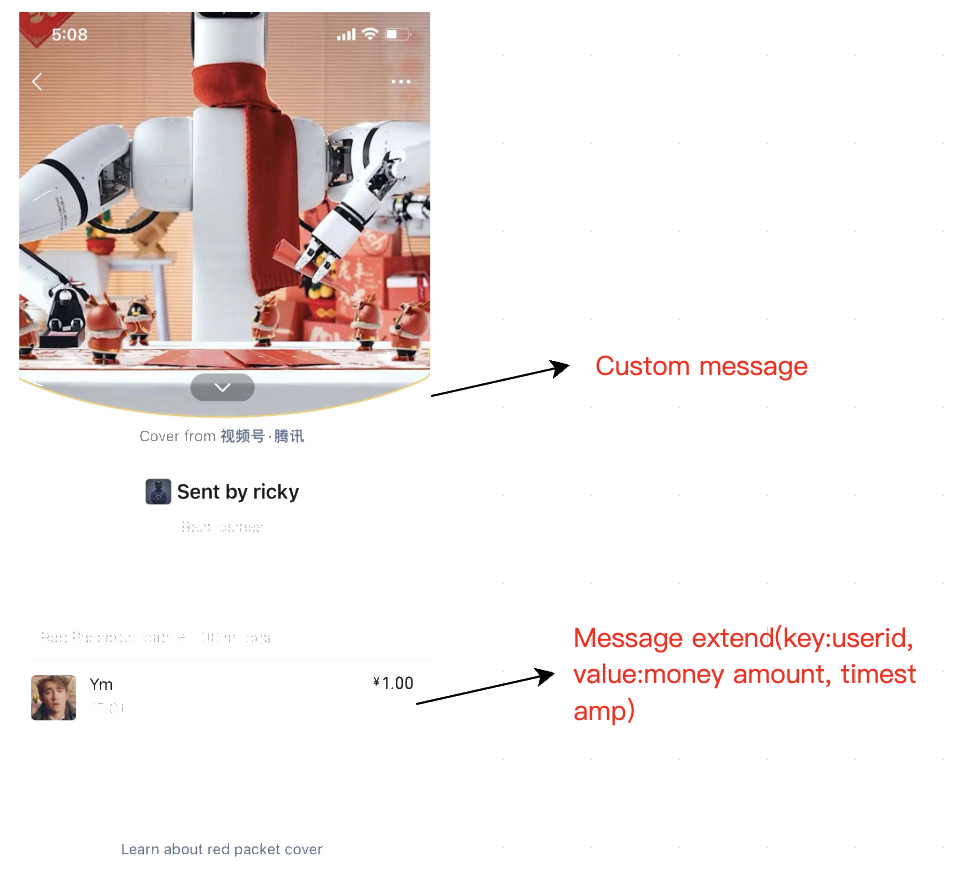
After a red packet is opened, the details page shows the cover image, sender, blessing message, total amount, and claim list. The claim list is retrieved from Message Extension Data.
Data Source
Displayed information includes:
Cover image, sender information, greeting message
Total amount
Claim list: claimant name, claimed amount, and claim time (from message extension data)
5. Complete Chat Workflow
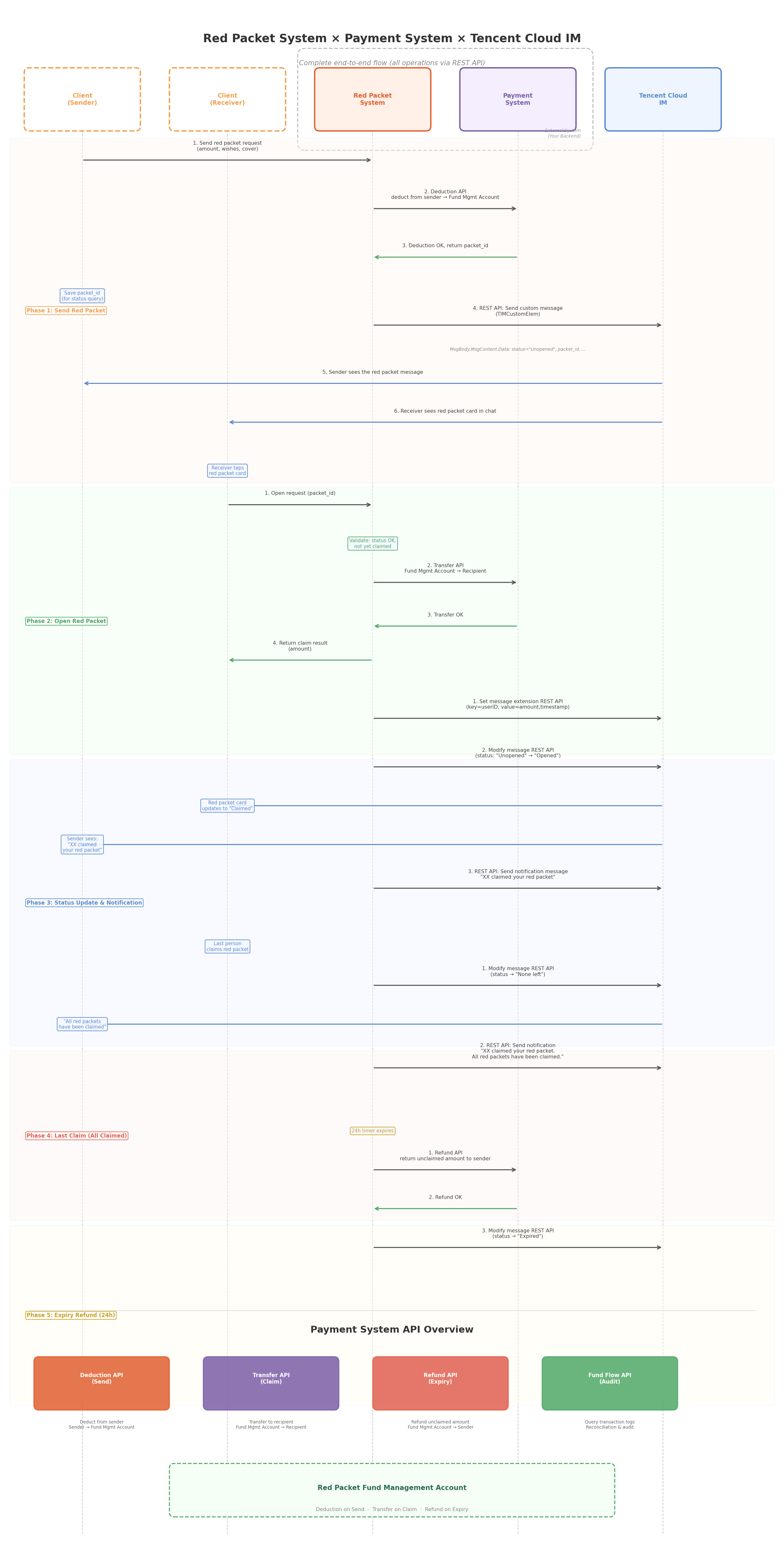
The following diagram illustrates the complete workflow for one-on-one red packets, from sending to claiming, including status updates and claim notifications via REST API.
Group Red Packet
1. Sending a Group Red Packet
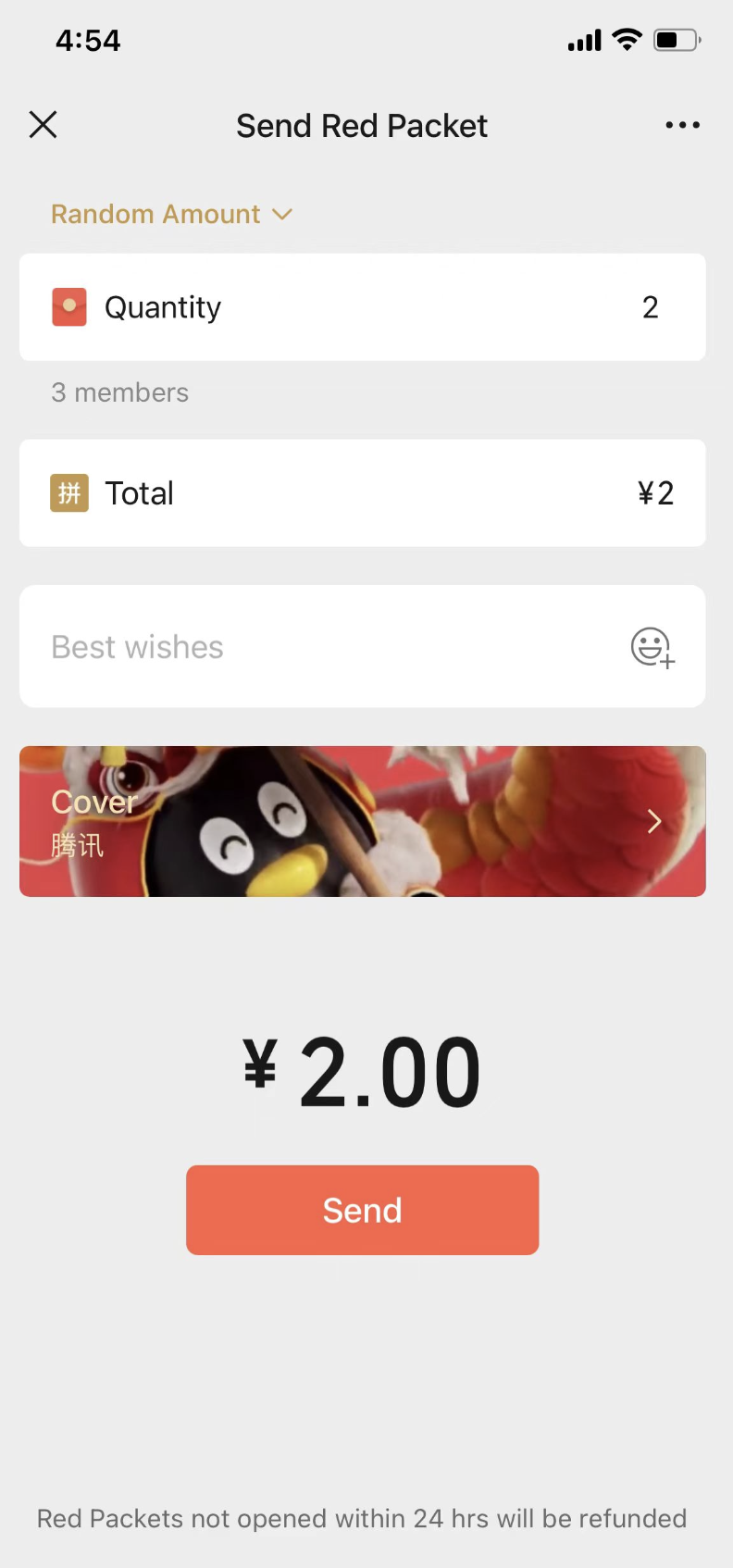
The sender selects random amount mode (Luckiest Draw), sets the quantity, total amount, greeting message, and cover. A tip at the bottom states "Red packets not claimed within 24 hours will be automatically refunded."
Implementation Steps
1. Client collects: total amount, quantity, greeting message, cover, and random amount flag.
2. Red Packet System calls the Payment System Deduction API to deduct the total amount.
3.
Red Packet System server sends the red packet as a custom message to the group using Send Group Message REST API, with From_Account set to sender user ID.
Example
The REST API request for group red packets is similar to the one-on-one scenario (see section 4.1), but uses Send Group Message REST API, sets GroupId to the target group, and adds quantity, total, and random_amount to the payload:
// POST https://console.tim.qq.com/v4/group_open_http_svc/send_group_msg
{
"GroupId":"group_id",
"From_Account":"sender_userid",
"Random":1287657,
"MsgBody":[
{
"MsgType":"TIMCustomElem",
"MsgContent":{
"Data":"{\\"BusinessID\\":\\"red_packet\\",\\"total\\":2.00,\\"quantity\\":3,\\"random_amount\\":true,\\"best_wishes\\":\\"Happy New Year!\\",\\"cover\\":\\"https://example.com/cover.png\\",\\"status\\":\\"Unopened\\",\\"packet_id\\":\\"rp_20260301_xyz789\\"}"
}
}
],
"SupportMessageExtension":1
}
2. Claiming Group Red Packets
When a group member claims a red packet:
1. Red Packet System validates: Are any packets left? Has the user already claimed this red packet?
2. Red Packet System calculates the claim amount:
Random amount mode: Distribute funds randomly (a "double mean" algorithm is commonly used).
Last claim: The final claimant receives all remaining funds.
3. Red Packet System calls the Payment System Transfer API to transfer the calculated amount to the claimant.
Last claim: "XX claimed your red packet. All your red packets have been claimed."
6.
If all packets are claimed, Red Packet System server updates status to "None left" via Modify Group Message REST API.
All message modification, extension data updates, and notifications are handled by the Red Packet System server via REST API. Group chat uses dedicated group APIs with GroupId + MsgSeq parameters. Status transitions include "None left".
Updating Group Red Packet Status via REST API
For the final claim (all packets claimed), the Red Packet System server updates status to "None left":
{
"GroupId":"group_id",
"MsgSeq":67890,
"MsgBody":[
{
"MsgType":"TIMCustomElem",
"MsgContent":{
"Data":"{\\"BusinessID\\":\\"red_packet\\",\\"total\\":2.00,\\"quantity\\":3,\\"random_amount\\":true,\\"best_wishes\\":\\"Happy New Year!\\",\\"cover\\":\\"https://example.com/cover.png\\",\\"status\\":\\"None left\\",\\"packet_id\\":\\"rp_20260301_xyz789\\"}"
}
}
]
}
Saving Group Red Packet Claim Records via REST API
{
"GroupId":"group_id",
"MsgSeq":67890,
"OperateType":1,
"ExtensionList":[
{
"Key":"user_daniel",
"Value":"1.40,1709312400"
},
{
"Key":"user_anson",
"Value":"0.10,1709312580"
}
]
}
Sending Claim Notification via REST API (Group Red Packet)
Last claim:"Daniel claimed your red packet. All your red packets have been claimed."
3. Group Red Packet Details Page
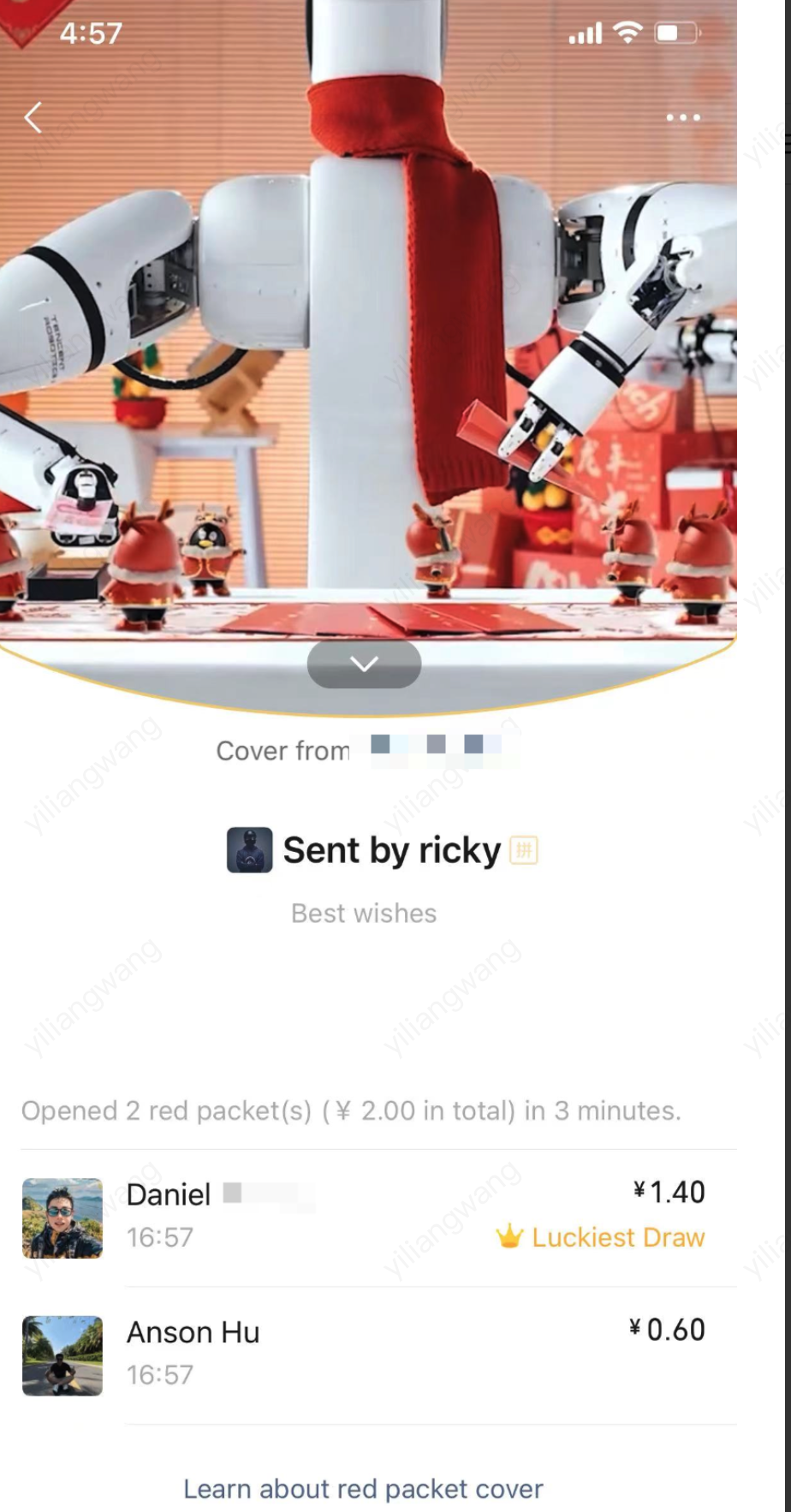
The group red packet details page displays the cover image, sender, blessing message, claim statistics, and claim list. The highest claim is marked as "Luckiest Draw".
Data Source
Displayed content includes:
Cover image, sender info, blessing message
Claim statistics (e.g., "Claimed 2 red packets, totaling $2.00, in 3 minutes")
Claim list: claimant name, avatar, claimed amount, claim time
Highest claim is labeled "Luckiest Draw"
Fetching Claimant Information
The message extension key is the claimant's userID. After retrieving the userID list from extension data, the client should call the Batch Get Group Member Info API to fetch avatars, nicknames, etc., for UI rendering.
Client: Call getGroupMembersInfo (Java / Swift) / Objective-C / C++), passing the extracted userID list to retrieve group member avatars (faceUrl), nicknames (nickName), etc., for the claim list UI.
Message Extension arrays support up to 300 elements, covering 99% of red packet scenarios. If the extension list exceeds 300, fetch claim details directly from your own red packet system rather than the extension.
4. Complete Group Chat Workflow
The diagram below shows the entire workflow for group red packets, from sending through all claims, including notifications for each claim and the "all red packets claimed" notice for the final claimant.
5. Differences Between Group and One-on-One Red Packets
Multiple claimants: Group red packets can be claimed by multiple members (up to quantity).
Amount distribution: In random mode, the red packet system calculates each claim amount randomly.