Flutter
下载
聚焦模式
字号
TUIKit Flutter 是基于腾讯云 Chat SDK 的一套 Flutter UI 组件库,提供了聊天、会话列表、联系人管理等即时通信功能的完整解决方案。本文介绍如何手动集成该组件并实现核心功能。
关键概念
TUIKit 提供了一套完整的即时通信 UI 组件,向下依赖 AtomicXCore 数据层,向上可构建各种功能性 Page。
Chat 组件层:基于基础组件和 AtomicXCore 封装的功能组件,您可将其嵌套到自己已有的 App 页面中。
基础组件层:通用 UI 能力和基础交互组件,为 Chat 组件层及业务 App 提供稳定、可复用的界面基础能力。
AtomicXCore(数据层):提供数据管理和业务逻辑,包含各种 Store 和 Manager。
前提条件
Flutter >= 3.29.0 版本,Dart >= 3.7.0 版本,Kotlin >= 1.9版本。
Android Studio Ladybug | 2024.2.1 及以上版本,Android Gradle plugin 7.3.1 以上版本,JDK 17 版本。
Xcode 12.0 及以上版本。
一个有效的腾讯云账号及 Chat 应用。可参考 开通服务 从控制台获取以下信息:
SDKAppID:App 在控制台获取的 Chat 应用的 ID,为应用的唯一标识。
SDKSecretKey:应用的密钥。
说明:
本项目目前仅支持手动集成,暂不支持通过 pub.dev 集成。
为确保构建环境稳定,请严格遵循官方兼容性要求进行配置:
Gradle、Android Gradle Plugin、JDK 与 Android Studio 的兼容性,请参阅 Android 官方文档:版本说明。
Kotlin、Android Gradle Plugin 与 Gradle 的版本对应关系,请参阅 Kotlin 官方文档:Kotlin-Gradle 插件兼容性。
使用 JDK 17 版本,其他版本可能导致编译失败,请参阅:Java 版本切换。
我们建议您根据上述指南,选择与项目要求完全匹配的版本组合。
集成并引入组件
下载源码
1. 从 GitHub 下载 TUIKit Flutter 源码:
git clone https://github.com/Tencent-RTC/TUIKit_Flutter.git
项目目录结构说明:
atomic-x/├── lib/ # UI 组件源码(必需集成)│ ├── album_picker/ # 相册选择器│ ├── base_component/ # 基础组件│ └── ... # 其他组件├── assets/ # 资源文件(必需集成)├── ... # 其他chat/├── uikit/lib/src/ # 功能组件│ ├── messagelist/ # 消息列表组件│ ├── messageinput/ # 消息输入组件│ ├── conversationlist/ # 会话列表组件│ ├── contactlist/ # 联系人列表组件│ ├── pages/ # page 组件(参考实现)│ ├── chat_page.dart│ ├── contacts_page.dart│ ├── conversations_page.dart│ └── ... # 其他 UI 组件└── demo/ # 示例应用(可选参考)
集成组件
1. 将组件目录完整复制到您的 Flutter 项目中,如下图所示,其中 flutter_demo 是示例项目,TUIKit_Flutter 是从 GitHub 上下载的组件源码:

2. 在您项目的
pubspec.yaml 文件中添加组件:tencent_chat_uikit:path: ../TUIKit_Flutter/chat/uikit
注意:
可以修改
chat/uikit/pubspec.yaml 文件里的 tuikit_atomic_x 依赖,改为依赖 pub 的线上版本。如需升级,您需要从 GitHub 获取最新的组件代码,覆盖您本地项目的 TUIKit_Flutter 目录。
当私有化修改和远端有冲突时,需要手动合并,处理冲突。
配置项目
在 iOS 端添加必要的权限配置。请打开 ios/Podfile ,在文件末尾新增如下权限代码:
post_install do |installer|installer.pods_project.targets.each do |target|flutter_additional_ios_build_settings(target)target.build_configurations.each do |config|config.build_settings['EXCLUDED_ARCHS[sdk=iphonesimulator*]'] = 'arm64'config.build_settings['ENABLE_BITCODE'] = 'NO'config.build_settings["ONLY_ACTIVE_ARCH"] = "NO"endtarget.build_configurations.each do |config|config.build_settings['GCC_PREPROCESSOR_DEFINITIONS'] ||= ['$(inherited)','PERMISSION_MICROPHONE=1','PERMISSION_CAMERA=1','PERMISSION_PHOTOS=1',]endendend
清理 Gradle 全局配置(仅 Android 需要):如果您本地存在
~/.gradle/init.gradle,运行如下命令:# 或者直接删除:rm -f ~/.gradle/init.gradlemv ~/.gradle/init.gradle ~/.gradle/init.gradle.backup
说明:
如果您本地不存在 Gradle 全局配置文件
~/.gradle/init.gradle,请忽略。如果存在,并且该文件里配置有 allprojects.repositories,可以删除 allprojects.repositories 相关内容,或者删除 ~/.gradle/init.gradle(建议备份文件),以免引起运行报错。配置 JDK 17(仅 Android 需要):在项目比如
chat/demo 目录下的 gradle.properties 里增加一条 org.gradle.java.home,用来配置 JDK 17 路径,请替换成您实际的 JDK 17 的完整路径。参考如下:# 请替换为您本地 JDK 17 的真实完整路径org.gradle.java.home=xx/Java/JavaVirtualMachines/jdk-17.0.6.jdk/Contents/Home
接入步骤
步骤1:配置用户鉴权
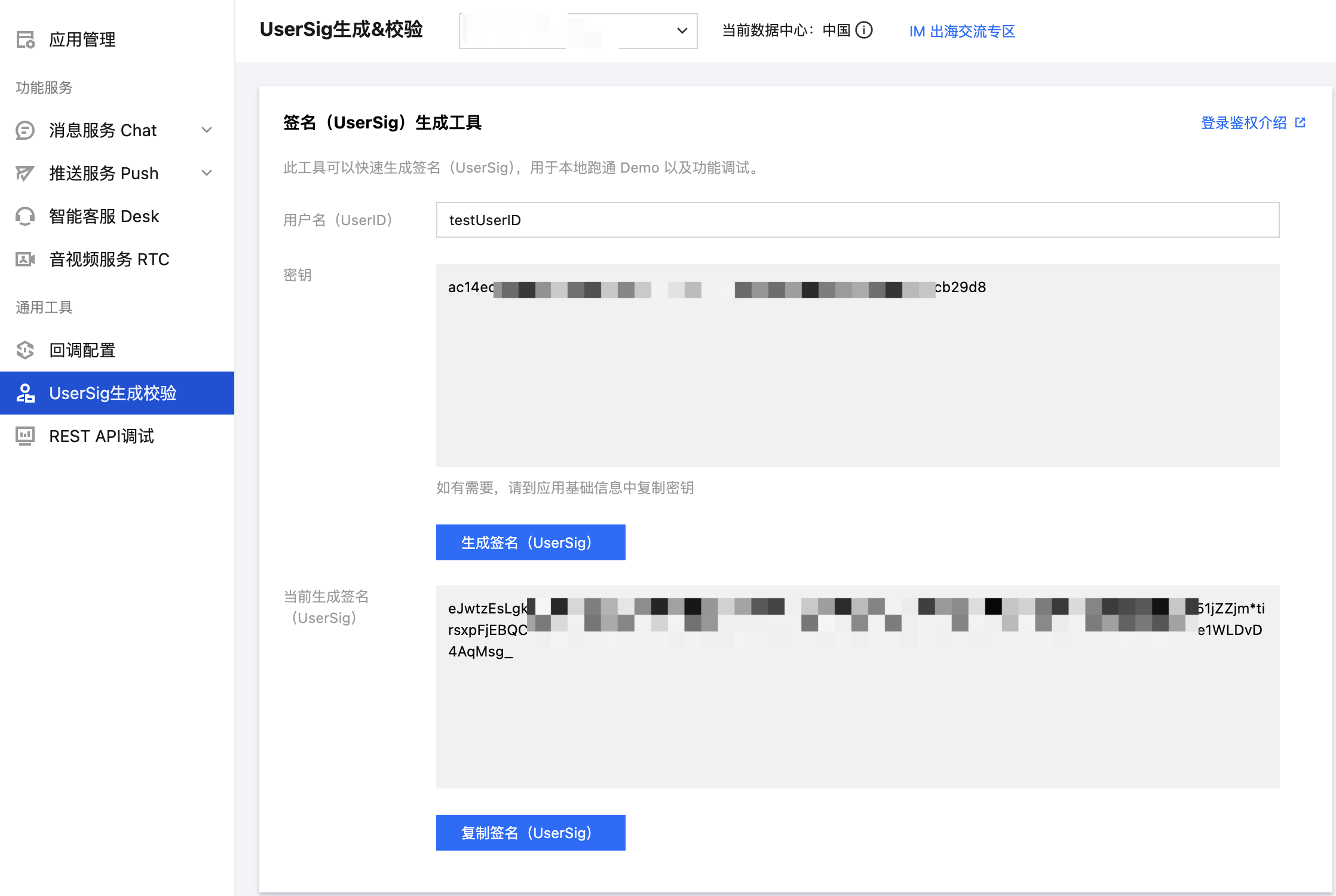
步骤2:用户登录
登录鉴权后才能正常使用组件的功能。您可以调用 login 接口,传入上文获取的 SDKAPPID、userID、userSig 用于登录鉴权:
final result = await LoginStore.shared.login(sdkAppID: SDKAPPID,userID: userID,userSig: userSig,);if (result.errorCode == 0) {// 登录成功,可跳转聊天或会话页} else {// 登录失败,可弹框报错}
警告:
步骤3:构建会话列表界面
您可以基于 TUIKit Flutter 中的 ConversationList 组件,构建一个会话列表页面。ConversationList 内建的功能是:
展示用户的会话列表,包含单聊和群聊会话
支持用户操作单个会话:置顶、删除、清空会话消息等
您可以将 ConversationList 直接集成到现有的 App 页面中,也可以新构建一个完整的会话列表页,组装后的一种 UI 效果如下图所示:
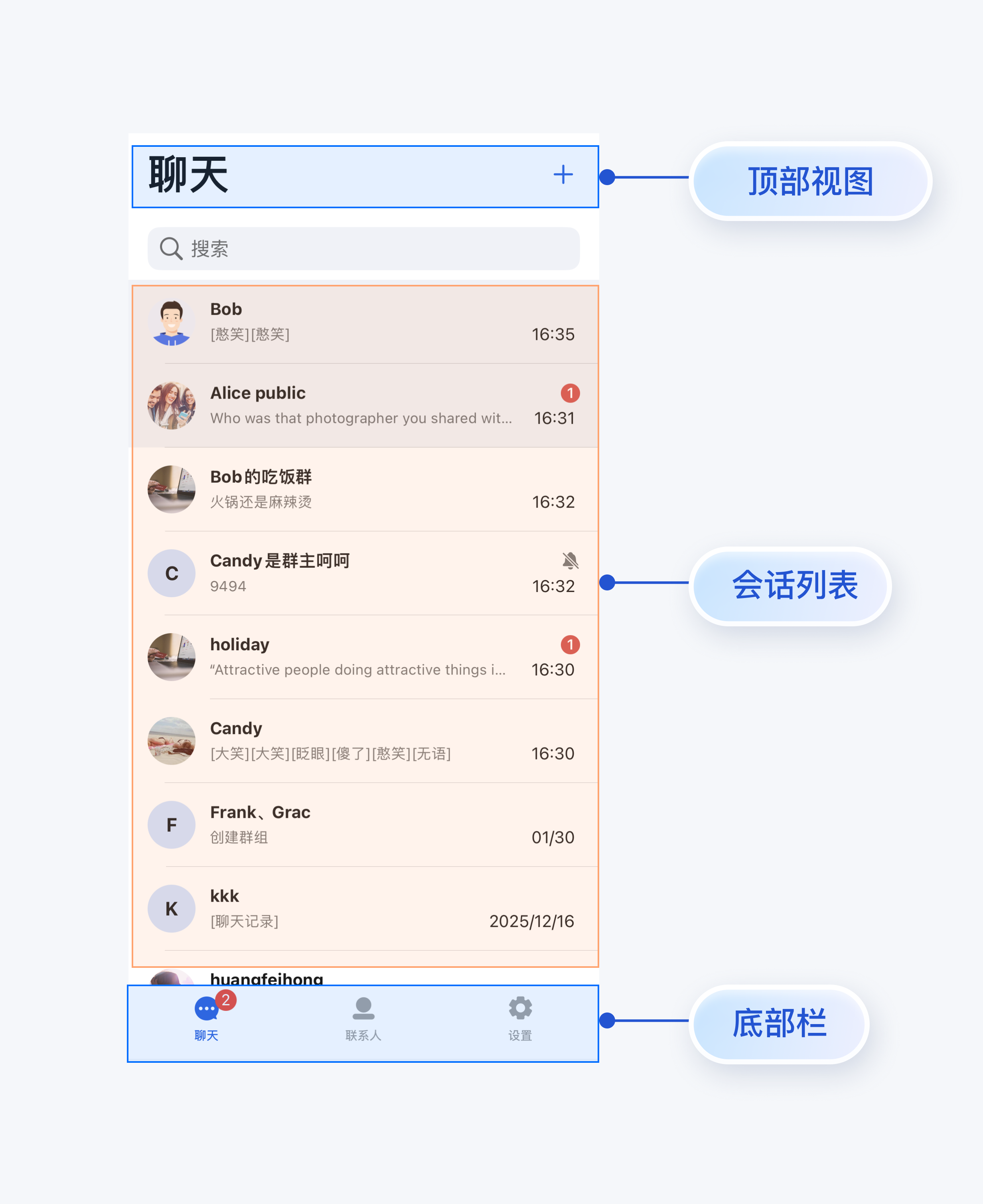
将 ConversationList 封装为会话列表页,可参考
chat/uikit/lib/src/pages/conversations_page.dart 文件里的实现,ConversationsPage 主要做了以下工作:1. 在 ConversationList 上方添加了 AppBar。
2. 实现点击会话列表 cell 事件。
3. 支持创建会话和群组功能:
3.1 点击右上角按钮可以创建新会话或群组
3.2 支持从联系人列表选择好友创建单聊
3.3 支持选择多个好友创建群聊
核心示例代码如下所示:
@overrideWidget build(BuildContext context) {return Scaffold(appBar: AppBar(backgroundColor: colorsTheme.bgColorOperate,title: Text(atomicLocale.chat, style: TextStyle(fontSize: 34, fontWeight: FontWeight.w600)),centerTitle: false,scrolledUnderElevation: 0,actions: [],),body: Column(children: [Expanded(child: ConversationList(onConversationClick: (conversation) {Navigator.push(context,MaterialPageRoute(builder: (context) => ChatPage(conversation: conversation,),),);},),),],),);}
步骤4:构建聊天界面
您可以基于 TUIKit Flutter 中的 MessageList、MessageInput 组件,构建一个聊天页面。
MessageList 内建的功能是:
展示单聊或群聊消息列表。
支持对单条消息操作:查看图片消息的大图、播放视频或语音消息、复制文本消息、撤回消息、删除消息等。
MessageInput 内建的功能是:
支持用户组建并发送多种类型的消息:文本、表情、图片、语音、视频、文件等。
您可以将 MessageList 和 MessageInput 直接集成到现有的 App 页面中,也可以新构建一个完整的聊天页,组装后的一种 UI 效果如下图所示:
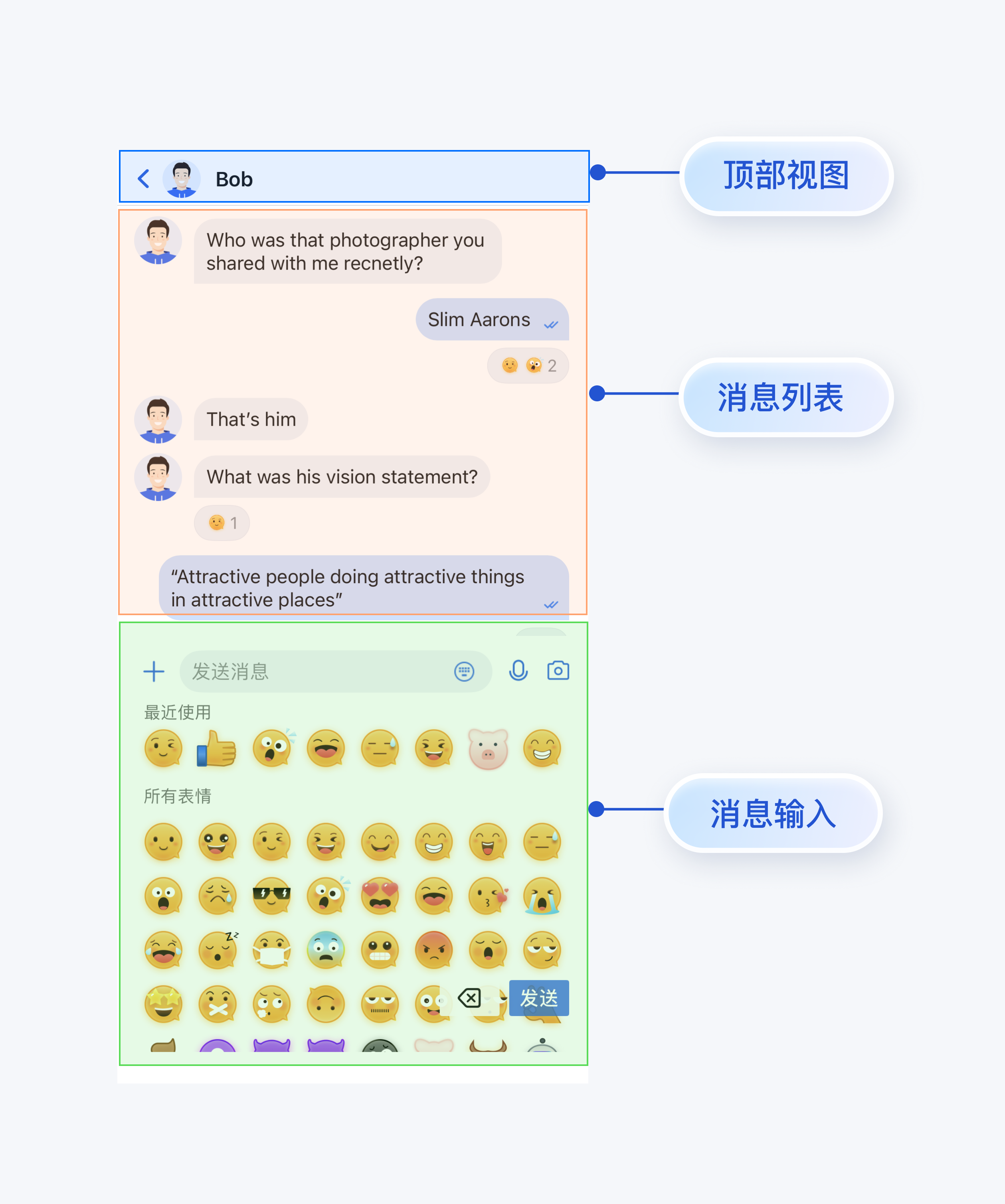
将 MessageList 和 MessageInput 组装为聊天页,可参考
chat/uikit/lib/src/pages/chat_page.dart 文件里的实现,ChatPage 主要做了以下工作:1. 在最上方添加了 AppBar,展示会话的名称。
2. 按照移动端用户使用习惯,上下拼接 MessageList 和 MessageInput。
核心示例代码如下所示:
@overrideWidget build(BuildContext context) {return Scaffold(appBar: AppBar(backgroundColor: colorsTheme.bgColorOperate,titleSpacing: 4.0,centerTitle: false,title: GestureDetector(onTap: _onTitleTap,child: Row(mainAxisSize: MainAxisSize.min,children: [Padding(padding: const EdgeInsets.only(right: 8.0),child: Avatar.image(name: widget.conversation.title,url: widget.conversation.avatarURL,),),Expanded(child: Text(widget.conversation.title ?? atomicLocale.chat,style: TextStyle(fontSize: 14, fontWeight: FontWeight.w600),overflow: TextOverflow.ellipsis,maxLines: 1,),),],),),scrolledUnderElevation: 0.0,leading: IconButton.buttonContent(content: IconOnlyContent(Icon(Icons.arrow_back_ios, color: colorsTheme.buttonColorPrimaryDefault)),type: ButtonType.noBorder,size: ButtonSize.l,onClick: () => Navigator.of(context).pop(),),actions: []),body: Column(children: [MessageList(conversationID: widget.conversation.conversationID,locateMessage: widget.message,onUserClick: (String userID) => _onUserClick(userID),),MessageInput(conversationID: widget.conversation.conversationID,),],),);}
步骤5:构建联系人界面
您可以基于 TUIKit Flutter 中的 ContactList 组件,构建一个联系人页面。ContactList 内建的功能是:
查看好友申请列表。
查看已加入的群列表。
处理群组邀请和申请。
管理黑名单列表。
查看好友。
您可以将 ContactList 直接集成到现有的 App 中,也可以新构建一个完整的联系人列表页,组装后的一种 UI 效果如下图所示:
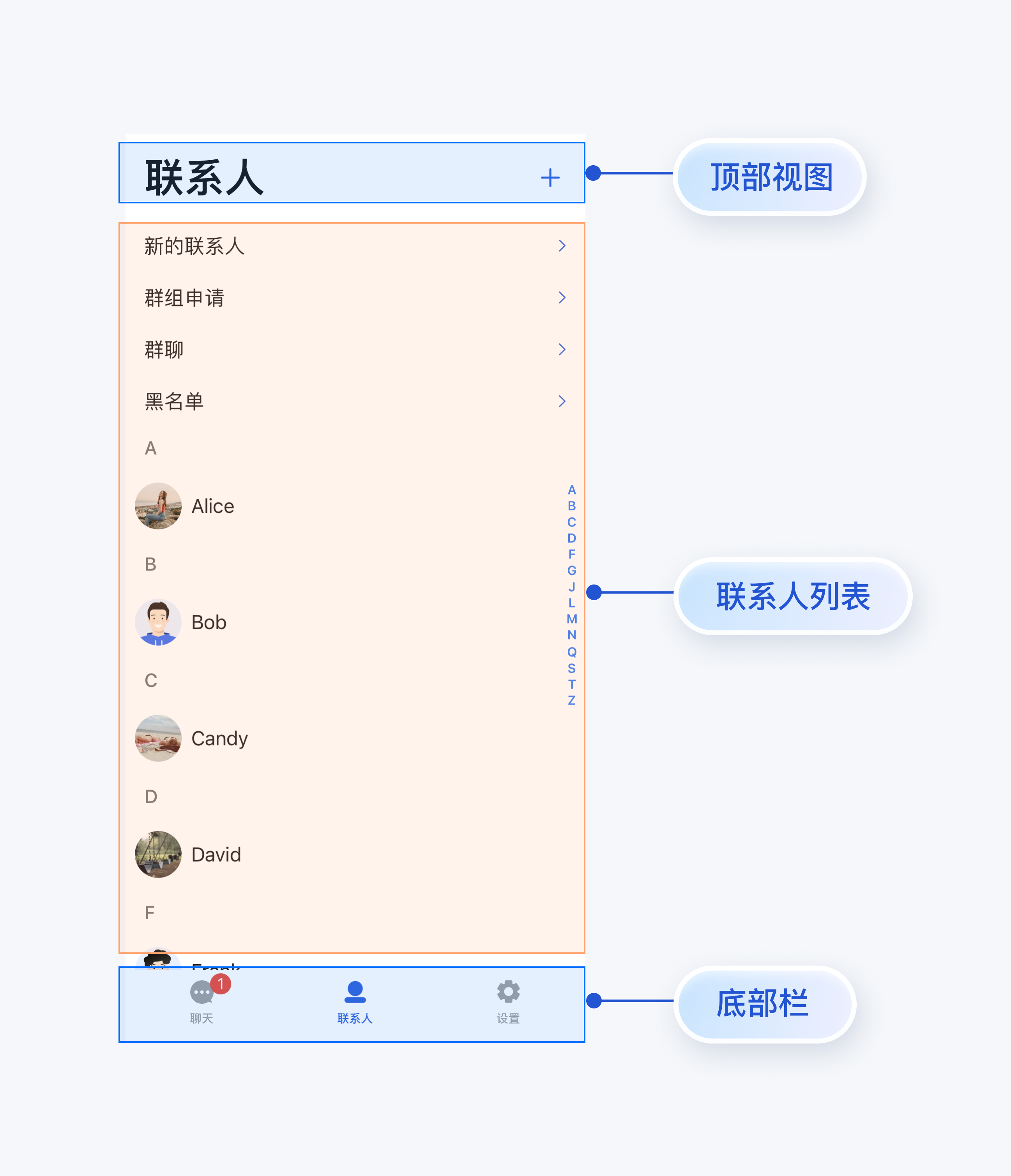
将 ContactList 封装为联系人列表页,可参考
chat/uikit/lib/src/pages/contacts_page.dart 文件里的实现,ContactsPage 主要做了以下工作:1. 在 ContactList 上方添加了 AppBar。
2. 实现点击联系人列表 cell 事件。
3. 支持添加联系人和添加群组:
3.1 点击右上角 "+" 按钮可以添加联系人或群组
3.2 支持根据 UserID 搜索目标联系人
3.3 支持根据 GroupID 搜索目标群组
核心示例代码如下所示:
@overrideWidget build(BuildContext context) {AtomicLocalizations atomicLocale = AtomicLocalizations.of(context);SemanticColorScheme colorsScheme = BaseThemeProvider.colorsOf(context);return Scaffold(appBar: AppBar(backgroundColor: colorsScheme.bgColorOperate,title: Text(atomicLocale.contact, style: TextStyle(fontSize: 34, fontWeight: FontWeight.w600),),centerTitle: false,scrolledUnderElevation: 0,actions: [],),body: ContactList(onGroupClick: (ContactInfo contactInfo) {_onGroupClick(context, contactInfo);},onContactClick: (ContactInfo contactInfo) {_onContactClick(context, contactInfo);},),);}
步骤6:完善界面间的跳转逻辑
ConversationsPage、ChatPage、ContactsPage 中实现了默认的用户点击事件,您可以自定义事件来实现页面间的交互:
Page | 回调 | 建议跳转逻辑 |
ConversationsPage | onConversationClick: (conversation) {} | 点击会话列表中的会话时触发,建议跳转到聊天页面(ChatPage)。 |
ContactsPage | onContactClick: (ContactInfo contactInfo) {} | 点击联系人 cell 时触发,建议跳转到用户信息页(C2CChatSetting)。 |
| onGroupClick: (ContactInfo contactInfo) {} | 点击群组 cell 时触发,建议跳转到群聊页面(ChatPage)。 |
ChatPage | onUserClick: (String userID) {} | 点击消息中的用户头像或昵称时触发,建议跳转到用户信息页(C2CChatSetting)。 |
| onChatHeaderClick: () {} | 点击导航栏中的头像时触发,建议跳转到用户信息页(C2CChatSetting)或群聊信息页(GroupChatSetting) |
| onBackClick: () {} | 点击返回按钮时触发,建议返回上一级页面。 |
您可以参考上述回调说明及代码,实现 Page 之间交互逻辑。
常见问题
集成 tuikit_atomic_x 组件后,有 theme_state 和 atomic_localizations 的报错怎么办?
组件支持主题颜色和国际化字符串切换,需要在项目根目录的
main.dart 文件中使用 ComponentTheme 来包装根 widget,并且需要在 MaterialApp 的 localizationsDelegates 中增加 AtomicLocalizations.delegate 的配置,可参考源码 Demo 中的 main.dart 文件的使用。登录失败,提示签名错误怎么办?
联系我们
文档反馈