Android (Compose)
Download
Focus Mode
Font Size
This guide will walk you through building a conversation list interface.
Development Environment Requirements
Android Studio Arctic Fox (2020.3.1) or later
Android SDK API Level 21 (Android 5.0) or later
Prerequisites
Before you begin, make sure you have completed the following steps:
1. Create an application in the console.
2. Create at least two user accounts in the console.
3. Integrate
TUIKit Compose.4. Call the
login method of LoginStore to authenticate the component.Note:
1. You only need to log in once each time the app is launched.
2. Make sure the login is successful. We recommend handling subsequent operations in the login success callback.
If you have not completed these four steps, please review the instructions in Quick Start before proceeding. Otherwise, you may encounter issues when implementing the features below.
If you have completed these steps, continue with the instructions below.
Step Instructions
Note:
If you have not sent any messages to users or groups, no conversations will be generated. In this case, loading the ConversationList will show an empty list. To see the conversation list in action, send messages to some accounts to trigger conversation creation. For details on sending messages in the chat interface, see Build Chat Interface.
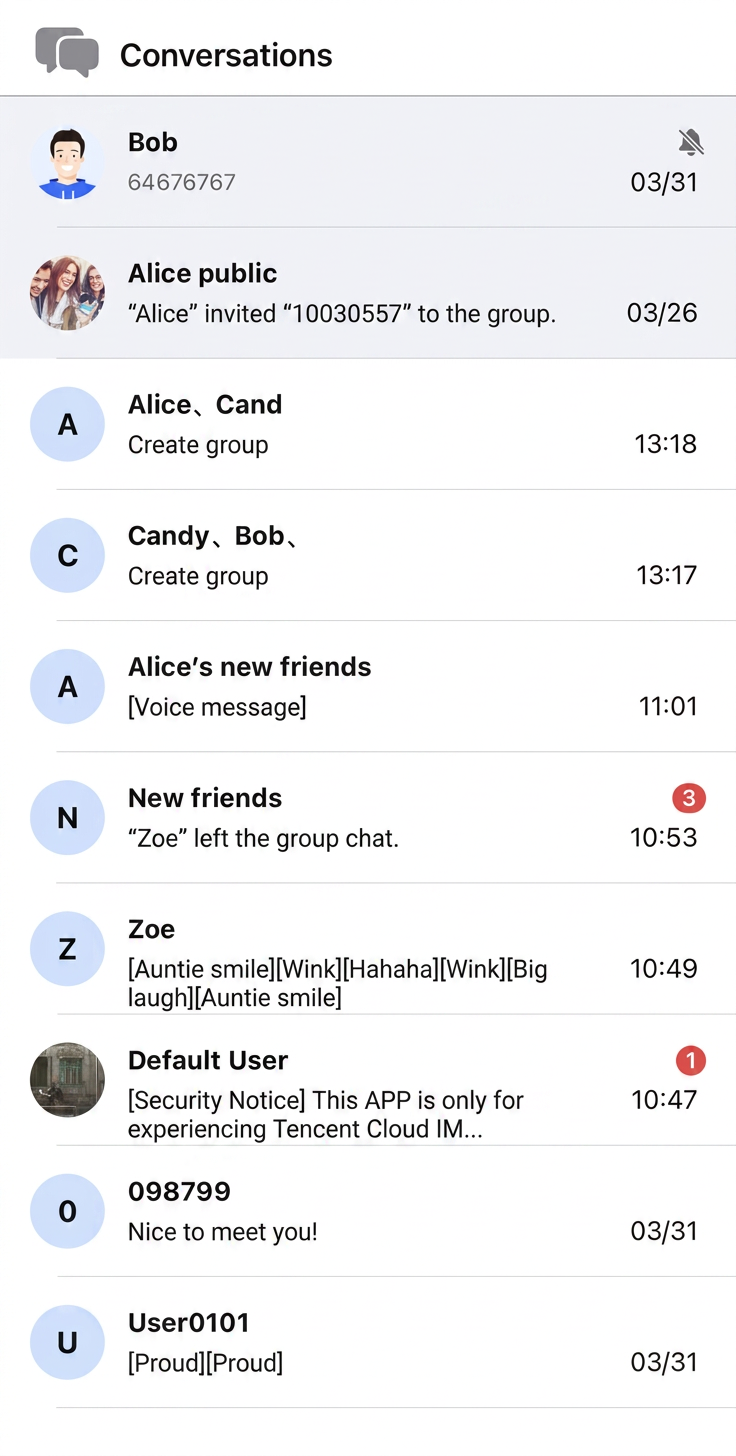
Build the conversation list interface using the ConversationList
@Composable component. Handle conversation list item clicks via the onConversationClick callback.If you use the sample code below, be sure to fill in the following parameters:
sdkAppID: The value you obtained earlier.userID: The operator's userID (for example, user1 created in Quick Start).userSig: The operator's userSig (for user1, as created in Quick Start).The app loads the conversation list page on startup. Sample code:
// ConversationListActivity.ktimport android.os.Bundleimport androidx.activity.compose.setContentimport androidx.appcompat.app.AppCompatActivityimport androidx.compose.foundation.backgroundimport androidx.compose.foundation.layout.Columnimport androidx.compose.foundation.layout.Rowimport androidx.compose.foundation.layout.Spacerimport androidx.compose.foundation.layout.fillMaxSizeimport androidx.compose.foundation.layout.fillMaxWidthimport androidx.compose.foundation.layout.heightimport androidx.compose.foundation.layout.paddingimport androidx.compose.foundation.layout.statusBarsPaddingimport androidx.compose.foundation.layout.widthimport androidx.compose.material3.HorizontalDividerimport androidx.compose.material3.Textimport androidx.compose.ui.Alignmentimport androidx.compose.ui.Modifierimport androidx.compose.ui.text.font.FontWeightimport androidx.compose.ui.unit.dpimport androidx.compose.ui.unit.spimport io.trtc.tuikit.atomicx.basecomponent.theme.LocalThemeimport io.trtc.tuikit.atomicx.conversationlist.ui.ConversationListimport io.trtc.tuikit.atomicxcore.api.CompletionHandlerimport io.trtc.tuikit.atomicxcore.api.login.LoginStoreclass ConversationListActivity : AppCompatActivity() {private val sdkAppID: Int = 1234567890 // TODO: Fill in your sdkAppID hereprivate val userID = "" // TODO: Fill in your userID hereprivate val userSig = "" // TODO: Fill in your generated userSig hereoverride fun onCreate(savedInstanceState: Bundle?) {super.onCreate(savedInstanceState)login()}private fun login() {LoginStore.shared.login(this, sdkAppID, userID, userSig, object : CompletionHandler {override fun onSuccess() {showConversationListPage()}override fun onFailure(code: Int, desc: String) {// Handle login failure}})}private fun showConversationListPage() {setContent {val colors = LocalTheme.current.colorsColumn(modifier = Modifier.fillMaxSize().background(color = colors.bgColorOperate).statusBarsPadding()) {// Navigation BarRow(modifier = Modifier.fillMaxWidth().padding(horizontal = 16.dp).height(44.dp),verticalAlignment = Alignment.CenterVertically) {Text(text = "Conversations",fontSize = 17.sp,fontWeight = FontWeight.W600,color = colors.textColorPrimary)}HorizontalDivider(color = colors.strokeColorPrimary)// ConversationListConversationList(onConversationClick = { conversation ->// Handle conversation click, for example, navigate to ChatPage// conversation.conversationID})}}}}
Sample interface:
Further Practice
Contact Us
Help and Support
Was this page helpful?
You can also Contact sales or Submit a Ticket for help.
Help us improve! Rate your documentation experience in 5 mins.
Feedback