Android (Compose)
Download
Focus Mode
Font Size
This guide shows you how to build a chat interface.
Development Environment Requirements
Android Studio Ladybug (2024.2.1) or later, and JDK 17.
A physical device or emulator running Android 6.0 (API 23) or later.
Prerequisites
Before you begin building the interface, complete the following steps:
1. Create an application in the console.
2. Create at least two user accounts in the console.
3. Integrate
TUIKit Compose.4. Call the
login method of LoginStore to authenticate with the component.Notice:
You only need to log in once each time the app launches.
Verify that login is successful. We recommend handling all subsequent operations inside the login success callback.
If you haven’t finished these four steps, see the relevant instructions in the Quick Start Guide before proceeding. Otherwise, you may encounter issues when implementing the features described below.
If you have completed these steps, continue reading.
Step-by-Step Instructions
One-on-one Chat Interface
Group Chat Interface
To access the group chat message interface, you need a valid groupID. Confirm that you have an existing groupID.
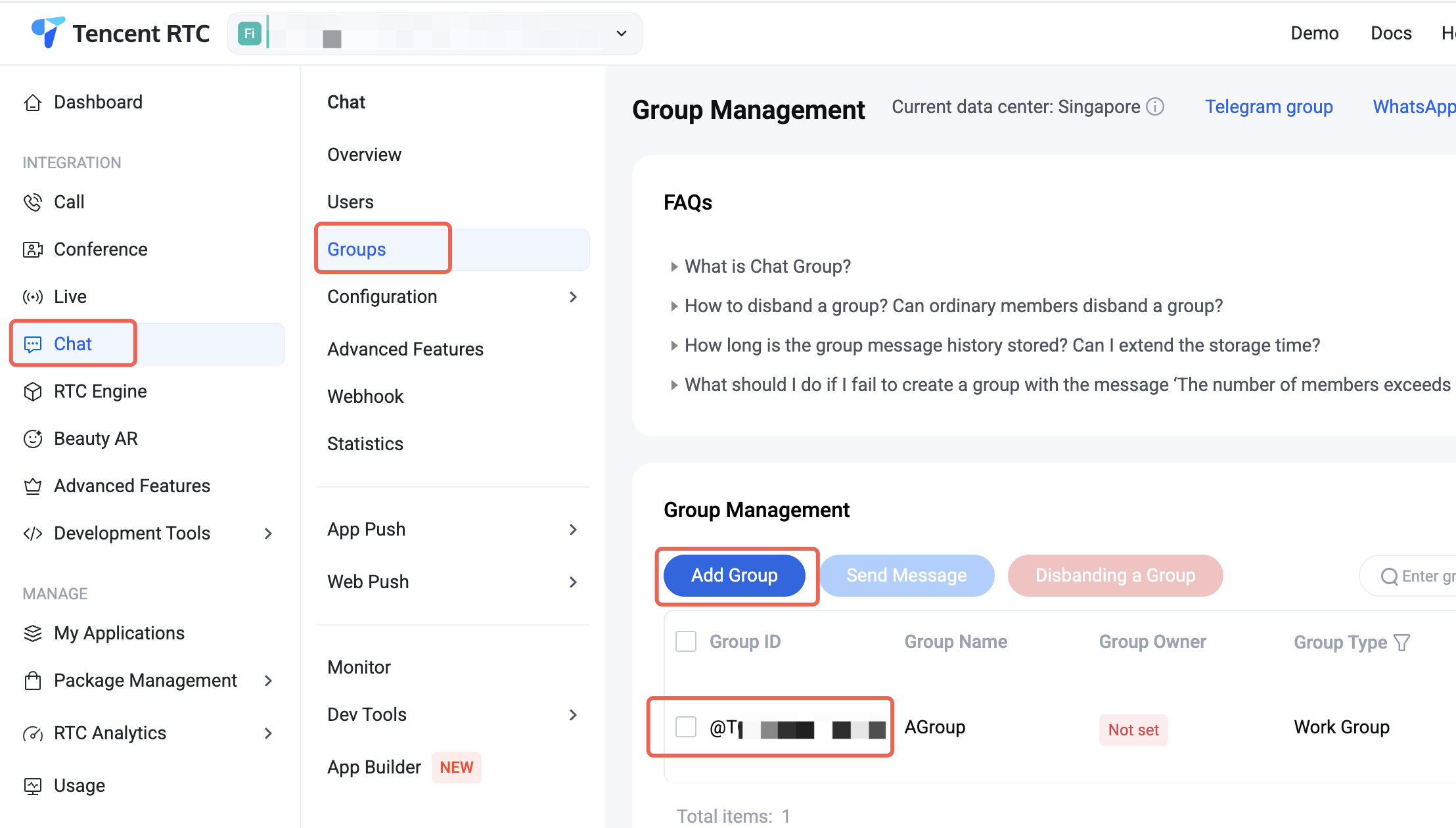
If you don’t have a group yet, create one in the Console. Go to: Chat > Group Management > Add Group.
After creating the group, the groupID will be displayed on the page:
The group chat interface uses two
@Composable components: MessageList and MessageInput.Note: If you use the sample code below, make sure to populate the following parameters:
sdkAppID: The sdkAppID you obtained earlier.senderUserID: The userID of the message sender—this is user1 you created in the Quick Start Guide.senderUserSig: The userSig for the sender—this is the userSig for user1 from the Quick Start Guide.groupID: The group ID.The app loads the group chat message list page on startup. Example code:
// GroupChatActivity.ktimport android.os.Bundleimport androidx.activity.compose.setContentimport androidx.appcompat.app.AppCompatActivityimport androidx.compose.foundation.backgroundimport androidx.compose.foundation.layout.Boximport androidx.compose.foundation.layout.Columnimport androidx.compose.foundation.layout.Rowimport androidx.compose.foundation.layout.fillMaxSizeimport androidx.compose.foundation.layout.fillMaxWidthimport androidx.compose.foundation.layout.heightimport androidx.compose.foundation.layout.navigationBarsPaddingimport androidx.compose.foundation.layout.paddingimport androidx.compose.foundation.layout.statusBarsPaddingimport androidx.compose.material3.HorizontalDividerimport androidx.compose.material3.Textimport androidx.compose.ui.Alignmentimport androidx.compose.ui.Modifierimport androidx.compose.ui.text.font.FontWeightimport androidx.compose.ui.unit.dpimport androidx.compose.ui.unit.spimport io.trtc.tuikit.chat.uikit.components.theme.LocalThemeimport io.trtc.tuikit.chat.uikit.components.messageinput.ui.MessageInputimport io.trtc.tuikit.chat.uikit.components.messagelist.ui.MessageListimport io.trtc.tuikit.atomicxcore.api.CompletionHandlerimport io.trtc.tuikit.atomicxcore.api.login.LoginStoreclass GroupChatActivity : AppCompatActivity() {private val sdkAppID: Int = 1234567890 // TODO: Enter your sdkAppID hereprivate val senderUserID = "" // TODO: Enter your userID hereprivate val senderUserSig = "" // TODO: Enter your generated userSig hereprivate val groupID = "" // TODO: Enter your groupID here// C2C conversationID: "c2c_${userID}", Group conversationID: "group_${groupID}"private val conversationID: String get() = "group_${groupID}"override fun onCreate(savedInstanceState: Bundle?) {super.onCreate(savedInstanceState)login()}private fun login() {LoginStore.shared.login(this, sdkAppID, senderUserID, senderUserSig, object : CompletionHandler {override fun onSuccess() {showGroupChatPage()}override fun onFailure(code: Int, desc: String) {// Handle login failure}})}private fun showGroupChatPage() {setContent {val colors = LocalTheme.current.colorsColumn(modifier = Modifier.fillMaxSize().background(color = colors.bgColorOperate).statusBarsPadding()) {// Navigation BarRow(modifier = Modifier.fillMaxWidth().padding(horizontal = 16.dp).height(44.dp),verticalAlignment = Alignment.CenterVertically) {Text(text = groupID,fontSize = 17.sp,fontWeight = FontWeight.W600,color = colors.textColorPrimary)}HorizontalDivider(color = colors.strokeColorPrimary)// MessageListBox(modifier = Modifier.weight(1f)) {MessageList(conversationID = conversationID,onUserClick = { userID ->// Handle user avatar click})}// MessageInputMessageInput(conversationID = conversationID,modifier = Modifier.navigationBarsPadding())}}}}
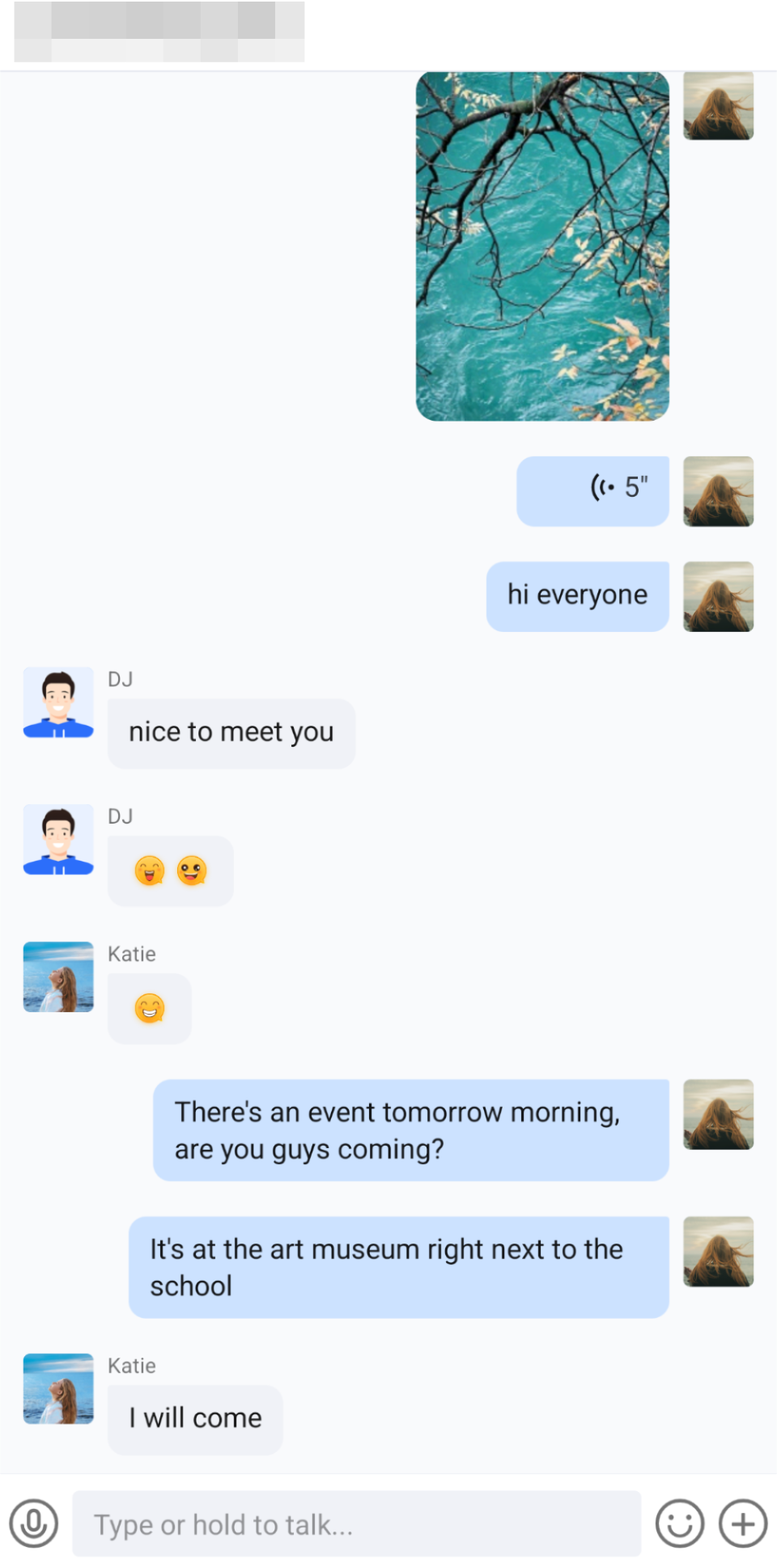
Sample interface:
Further Practice
Contact Us
Help and Support
Was this page helpful?
You can also Contact sales or Submit a Ticket for help.
Help us improve! Rate your documentation experience in 5 mins.
Feedback