iOS (SwiftUI)
Download
Focus Mode
Font Size
This guide explains how to build a chat interface.
Development Environment Requirements
Xcode 15 or later
iOS 15.0 or later
Prerequisites
Before you begin, complete the following steps:
1. Create an application in the console.
2. Create at least two user accounts in the console.
3. Integrate
TUIKit SwiftUI into your project.4. Call the
login method of LoginStore to authenticate a user.Notice:
1. You only need to log in once each time the app starts.
2. Make sure the login is successful. We recommend that you proceed with the following steps inside the login success callback.
If you have not completed these four steps, refer to Quick Start before continuing. Otherwise, you may encounter issues when implementing the features below.
If you have completed these steps, continue with the instructions below.
Step-by-Step Instructions
One-on-one Chat Interface
Group Chat Interface
To enter the group chat interface, you need a valid groupID that corresponds to an existing group.
If you have not created a group, go to the Console and create one. Path: Chat > Group Management > Add Group.
Once the group is created, you can view the groupID on the current page:
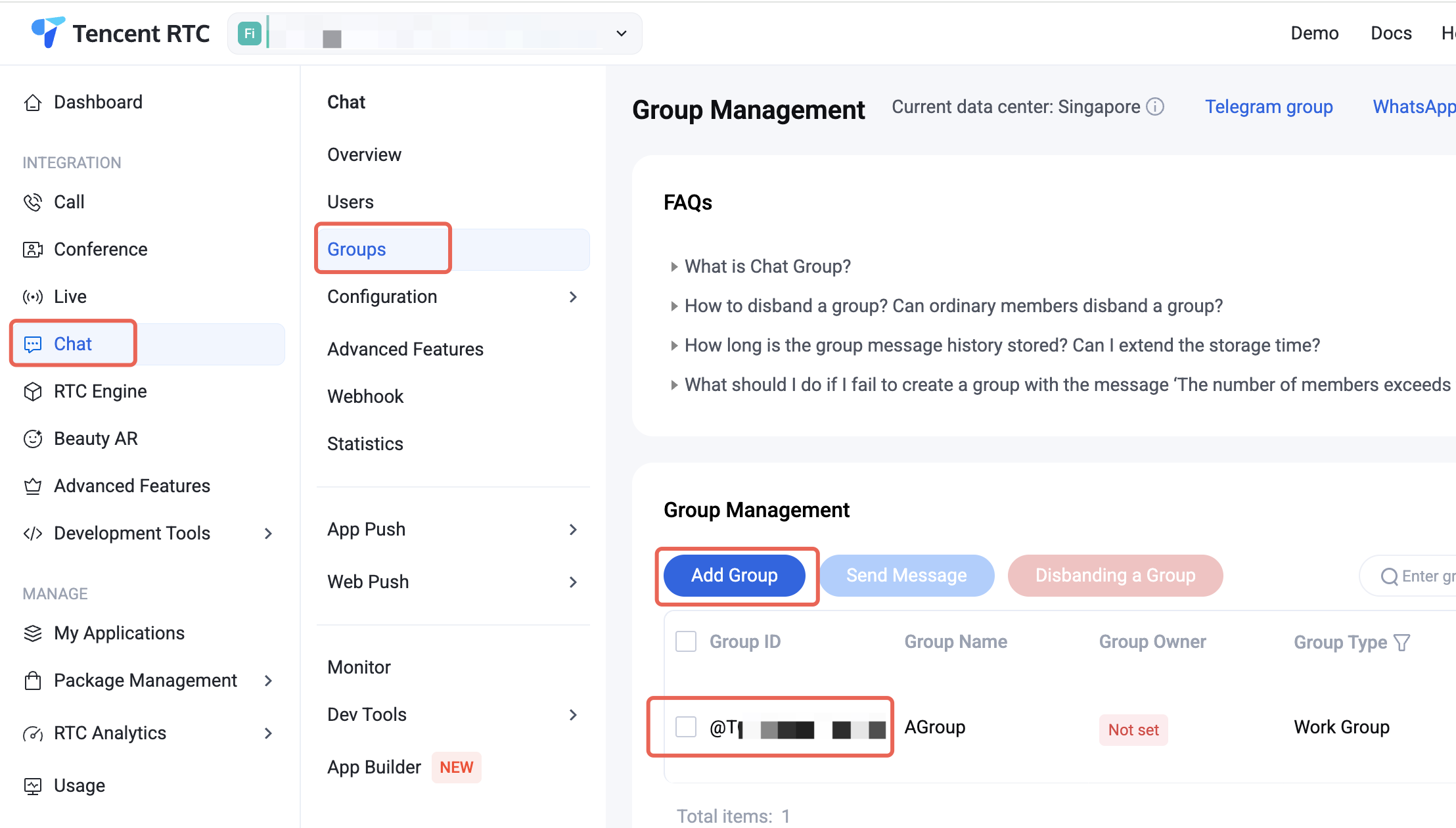
Note: If you use the sample code below, you must fill in the following parameters:
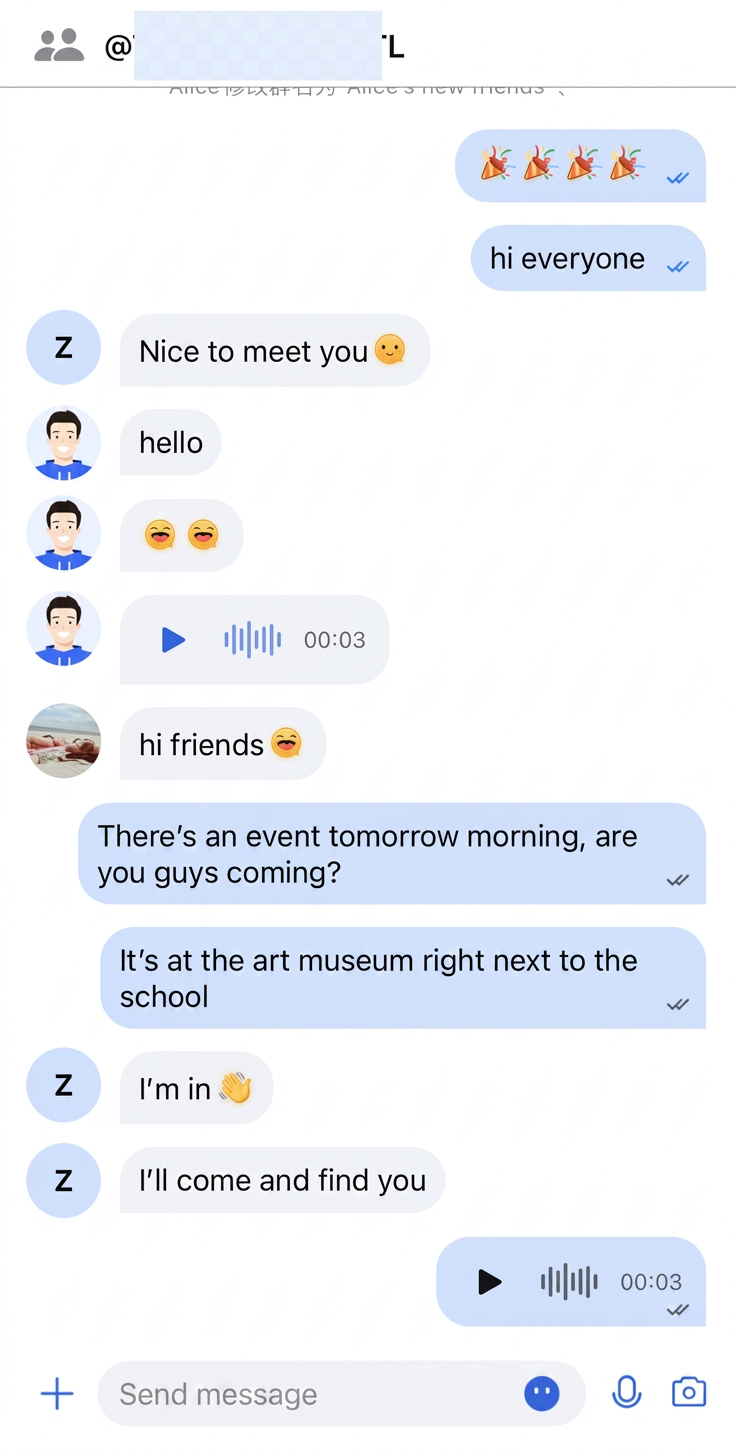
sdkAppID: The sdkAppID you obtained earlier.senderUserID: The userID of the message sender (e.g., user1 from Quick Start).senderUserSig: The userSig for the message sender, generated for user1 in Quick Start.groupID: The group ID.When the app launches, it will load the group chat message list page. Example code:
// ContentView.swiftimport SwiftUIstruct ContentView: View {var body: some View {GroupChatPage()}}// GroupChatPage.swiftimport AtomicXimport AtomicXCoreimport SwiftUIpublic struct GroupChatPage: View {@StateObject private var themeState = ThemeState.shared@State private var isLoggedIn = false@State private var isLoggingIn = true@State private var loginError: String? = nilprivate let sdkAppID: Int32 = 1234567890 // TODO: Fill in the sdkAppID hereprivate let senderUserID = "" // TODO: Fill in your userID hereprivate let senderUserSig = "" // TODO: Fill in your generated userSig hereprivate let groupID = "" // TODO: Fill in the groupID hereprivate var conversationID: String {// C2C conversationID: "c2c_\\(userID)", Group conversationID: "group_\\(groupID)""group_\\(groupID)"}public var body: some View {Group {if isLoggedIn {groupChatContentView} else if isLoggingIn {ProgressView("Logging in...")} else {VStack(spacing: 12) {Image(systemName: "exclamationmark.triangle").font(.system(size: 40)).foregroundColor(.orange)Text(loginError ?? "Login failed").foregroundColor(.secondary)}}}.environmentObject(themeState).onAppear {login()}}// MARK: - Group Chat Contentprivate var groupChatContentView: some View {VStack(spacing: 0) {navigationBarViewDivider().background(.gray)VStack(spacing: 0) {// Add MessageList to this page.MessageList(conversationID: conversationID,onUserClick: { userID inprint(">>>>> onUserClick: \\(userID)")})// Add MessageInput to this page.MessageInput(conversationID: conversationID)}.ignoresSafeArea(.keyboard)}}// MARK: - Navigation Barprivate var navigationBarView: some View {HStack {Image(systemName: "person.2.fill").font(.system(size: 20)).foregroundColor(.gray)Text(groupID).font(.system(size: 17, weight: .semibold)).foregroundColor(themeState.colors.textColorPrimary)Spacer()}.padding(.horizontal, 16).frame(height: 44)}// MARK: - Loginprivate func login() {guard !senderUserSig.isEmpty else {isLoggingIn = falseloginError = "userSig is empty. Please fill in a valid userSig."return}// Login is required when page appears.LoginStore.shared.login(sdkAppID: sdkAppID, userID: senderUserID, userSig: senderUserSig) { result inswitch result {case .success:print("Login success, userID: \\(senderUserID)")isLoggedIn = trueisLoggingIn = falsecase .failure(let error):print("Login failed: \\(error.code), \\(error.message)")loginError = "Login failed: \\(error.code), \\(error.message)"isLoggingIn = false}}}}
Sample result:
Further Practice
Contact Us
Help and Support
Was this page helpful?
You can also Contact sales or Submit a Ticket for help.
Help us improve! Rate your documentation experience in 5 mins.
Feedback