tencent cloud

Content Delivery Network

Updates and Announcements
Release Notes
Announcements
User Tutorial
Product Introduction
Product Overview
Strengths
Use Cases
Term
Use Limits
CDN Performance Descriptions (Spot-check)
Purchase Guide
CDN Purchase Guide
ECDN Purchase Guide
Getting Started
Configuring CDN from Scratch
Adding Domain Names
CNAME Configuration
Domain Name Ownership Verification
FAQs about Domain Name Connection
Configuration Guide
Domain Management
Domain Name Configurations
Statistical Analysis
Purge and Prefetch
Log Management
EdgeOne
Service Query
Offline Cache
Permission Management
Permission Configuration
Console Permissions
Activate Real-time Logging as Sub-account/Collaborator
Use Cases
Accelerating Resources on COS with CDN
Practical Tutorial
Guide to Using the EdgeOne Tool for Migrating Content Delivery Network (CDN) Related Services
CDN - CVM
CDN - COS
Configuring CNAME via DNSPod
Regularly Storing CDN Logs
API Documentation
History
Introduction
API Category
Content Management APIs
Real-time Log APIs
Service Query APIs
Data Query APIs
Making API Requests
Log Query APIs
StopCdnDomain
Configuration Management APIs
Obsoleted APIs
Other APIs
Data Types
Error Codes
FAQ
Features
Billing
FAQs about Domain Name Connection
Cache Configuration FAQs
Purge and Prefetch
Statistical Analysis
FAQs about HTTPS
Connection
Errors
Troubleshooting Methods
Status Codes and Solutions
Node Cache Inconsistency
Slow Access Speed After CDN Activation
Low Traffic Hit Rate
404 Status Code
Page Display - CORS error
Resource Cache Failure
Service Level Agreement
Glossary

Product Overview

PDF
Focus Mode
Font Size
Last updated: 2021-11-15 14:05:39

CDN Overview

Content Delivery Network (CDN) is a new layer of network architecture built on the existing internet. It consists of high-performance cache nodes distributed around the globe to accelerate internet content delivery. These nodes store your content based on caching policies. When a user makes a content request, it will be routed to the node closest to the user, reducing access delay and improving availability.
CDN offers an effective solution to the following network issues:
1. The long physical distance between the user and the business server requires the request to be forwarded multiple times, leading to high latency and instability.
2. The ISP used by the user is different from that used by the business server, so the request needs to be forwarded between ISPs after they are interconnected.
3. The business server has limited bandwidth and processing capabilities, resulting in slower response and lower availability when there are massive amounts of user requests.
CDN is easy to use. You do not need to adjust your business structure or manage any complex configurations. For more information, please see Getting Started.

How Acceleration Works

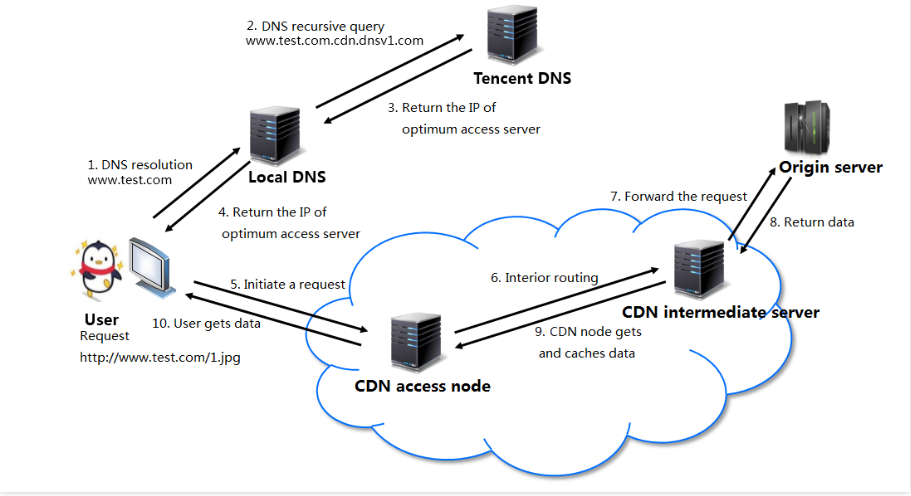
For example, if your business origin server's domain name is www.test.com and has been connected with the CDN to activate the acceleration service, when a user makes an HTTP request, the request will be processed as shown below:


The process is detailed below:
1. When a user makes an access request for an image resource (e.g., 1.jpg) at www.test.com, a domain name resolution request will be initiated to the local DNS.
2. When the local DNS resolves www.test.com, it will find that CNAME www.test.com.cdn.dnsv1.com has been configured, so the resolution request will be sent to Tencent DNS (GSLB), the proprietary scheduling system of Tencent Cloud that will assign the optimal node IP for the request.
3. The local DNS receives the resolved IP returned by Tencent DNS.
4. The user receives the resolved IP.
5. The user makes an access request for 1.jpg to the received IP.
6. If the CDN node corresponding to the IP has already cached 1.jpg, data will be directly returned to the user (10) and the request will end. Otherwise, the CDN node will initiate a request for 1.jpg to the origin server (6, 7, and 8). After receiving the resource, the CDN node will cache it (9) based on the caching policy configured (please see Cache Expiration Configuration and return it to the user (10) to end the request.

Help and Support

Was this page helpful?

Help us improve! Rate your documentation experience in 5 mins.

Feedback