Por padrão, em geral, os conteúdos entregues pelo CDN são recursos públicos, que podem ser acessados por usuários com URLs. Para evitar que usuários mal-intencionados façam hotlinking de seu conteúdo com fins lucrativos, você pode configurar a autenticação avançada de carimbo de data/hora, além de políticas de controle de acesso, como lista de bloqueio/permissões de referencial, lista de bloqueio/permissões de IP e limite de frequência de acesso de IP.
Atenção:
Após a configuração da proteção de hotlink de carimbo de data/hora, o cliente precisa calcular a assinatura conforme configurada e transportá-la para o servidor ao iniciar uma solicitação. O nó do CDN autenticará a assinatura no servidor, que será aprovada somente após a autenticação.
Guia de configuração
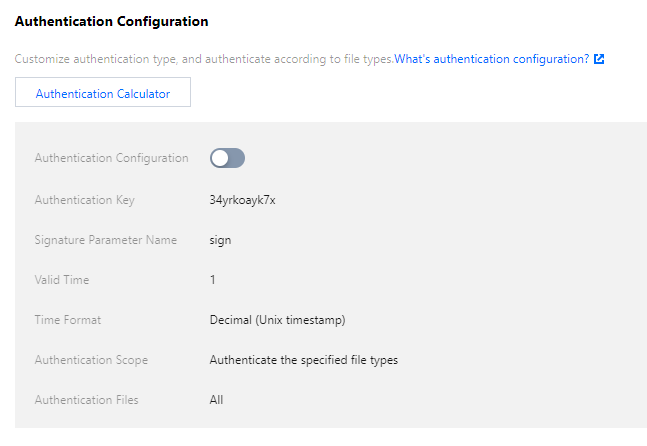
Visualização da configuração
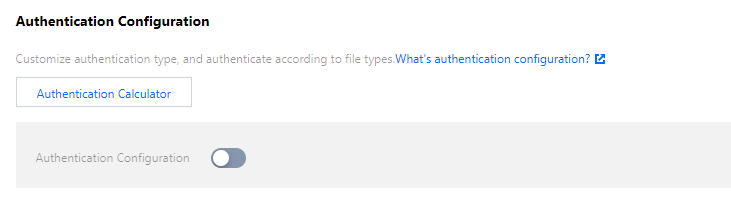
Faça login no console do CDN, selecione Domain Management (Gerenciamento de domínio) na barra lateral esquerda e clique em Manage (Gerenciar) à direita do nome de domínio para acessar a página de configuração. Na guia Security Configuration (Configuração de segurança), encontre a configuração de autenticação, que fica desativada por padrão:
Modificação da configuração
1. Modificar a configuração
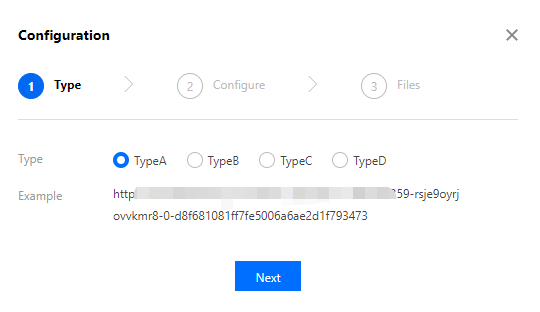
O CDN fornece quatro modelos de cálculo de assinatura de autenticação para você escolher. Você pode usar a Authentication Calculator (Calculadora de autenticação) fornecida para visualizar esses modelos. Para obter mais informações sobre o efeito de configuração e algoritmos, consulte os documentos de algoritmos específicos para TypeA, TypeB, TypeC e TypeD:
2. Desativar a configuração
Você pode alternar o botão de configuração de autenticação para desativar essa funcionalidade. Quando o botão de alternância estiver desativado, as configurações existentes não terão efeito no ambiente de produção. Se você ativar o botão de alternância, aparecerá uma mensagem solicitando confirmação antes que a configuração entre em vigor em toda a rede.
3. Adicionar uma configuração específica da região
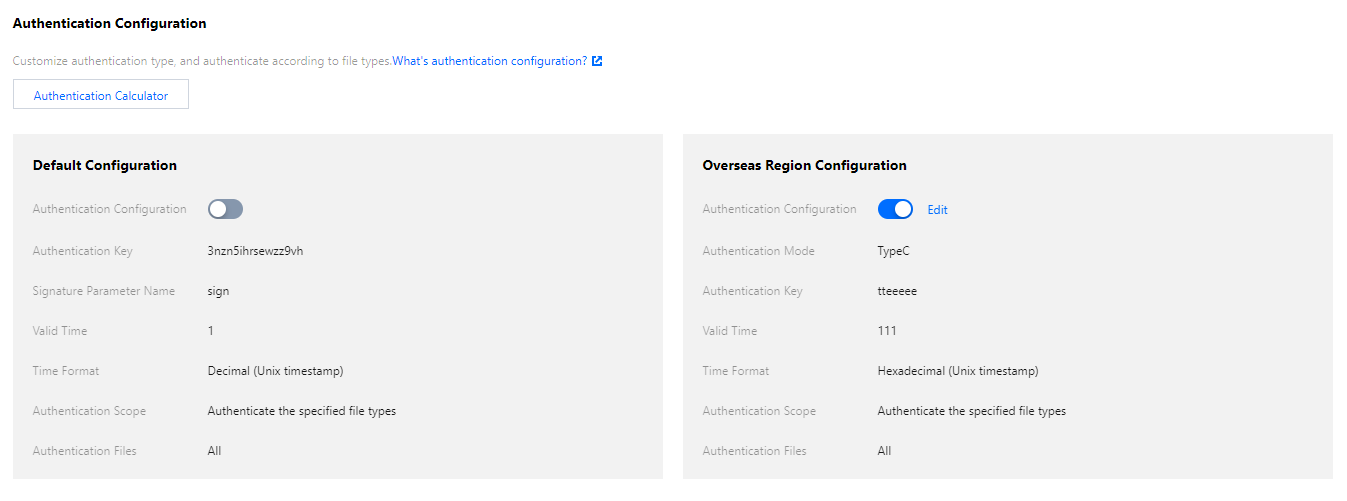
Se o seu nome de domínio de aceleração estiver configurado para a aceleração global e você quiser que a aceleração dentro e fora da China Continental tenha configurações de autenticação diferentes, você pode clicar em Add Special Configuration (Adicionar configuração especial) na configuração.
Atenção:
Atualmente, um item adicionado de configuração específico da região não pode ser excluído, mas pode ser apenas desativado.
Exemplo de configuração
Suponha que o nome de domínio cloud.tencent.com esteja configurado para a aceleração global e a configuração de autenticação seja a seguinte:
O efeito real será:
1. Um usuário na China Continental pode acessar o recurso http://cloud.tencent.com/1.jpg iniciando uma solicitação diretamente.
2. Um usuário fora da China Continental pode acessar o recurso http://cloud.tencent.com/1.jpg iniciando uma solicitação com um URL no formato de http://cloud.tencent.com/509301d10da7b862052927ed7a947f43/5e561139/1.jpg.
Código de exemplo
Veja a seguir o método de cálculo de autenticação com a demonstração para Python como exemplo:
import requests
import json
import sys
importtime
import hashlib
def generate_url(category, ts=None):
url ='http://www.test.com'# Test domain name
path ='/1.txt'# Access path
suffix ='?a=1&b=2'# URL parameter
key ='abc123456789'# Authentication key
now = int(time.mktime(time.strptime(ts, "%Y%m%d%H%M%S"))if ts else time.time())# If a `ts` is entered, it will be used; otherwise, the current `ts` will be used
sign_key ='key'# URL signature field
time_key ='t'# URL time field
ttl_format =10# Time format. Valid values: 10, 16. This is supported only for type D