Video upload from server refers to uploading videos to the VOD platform by the application backend. This document describes how to upload videos by using server APIs.
Prerequisites
1. Activate the service
Activate the VOD service.
2. Get TencentCloud API key
Get the security credentials (i.e., SecretId and SecretKey) required to call the server API in the following steps:
1. Log in to the console and select Products > Cloud Access Management > API Key Management to enter the "API Key Management" page.
2. Get the TencentCloud API key. If you have not created a key, click Create Key to create a pair of SecretId and SecretKey.
Directions
1. Initiate upload
An upload can be initiated through the SDK or API.
Initiating upload through SDK
To facilitate the upload feature in your development environment, VOD provides SDKs for different programming languages. The SDK for each language comes with a corresponding demo. For more information, please see:
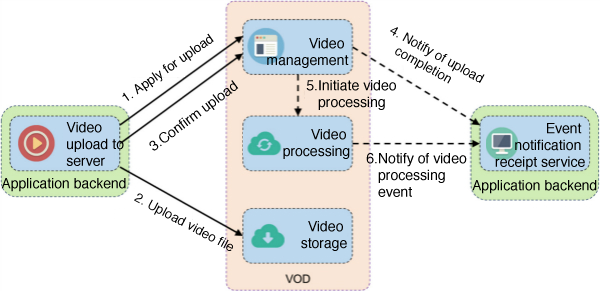
If the upload SDK provided by VOD does not apply to the programming language used by your application backend, the application backend needs to call VOD server APIs for video upload (this method is more complicated and not recommended). The business flow of API-based upload is as follows:
API-based upload requires you to implement steps such as applying for upload and uploading file on your own, which is not so convenient as SDK-based upload. Plus, you need to develop multipart upload logic for uploading large files. For more information, please see:
Specify a task flow during upload
If you want to automatically initiate a video processing task flow such as transcoding and screencapturing upon video upload completion, you can specify the Procedure parameter when calling the server API ApplyUpload, and the parameter value should the name of the desired task flow template. VOD supports creating task flow templates and naming them. When initiating a task flow, you can use the task flow template name to indicate the desired task. All the SDKs provided by VOD for different programming languages support specifying the task flow parameter. For more information, please see:
Specify a storage region during upload
The storage region provided by VOD is "Singapore" by default. If you want to store files in another region, you need to activate it in the console. For more information, please see Upload Storage Settings. After the settings are made, the storage region can be specified by the StorageRegion parameter when the server API ApplyUpload is called, and the parameter value should be a region abbreviation. All the SDKs provided by VOD for different programming languages support specifying the storage region during upload. For more information, please see:
VOD supports specifying passthrough fields during video upload, which will be sent to the application backend upon event completion. The following fields are in the event notification:
SourceType: this field is always ServerUpload, indicating that the upload originates from a server.
SourceContext: this is a custom passthrough field specified by the application backend during signature distribution, which corresponds to the sourceContext parameter in the signature.
VOD supports automatic video processing upon video upload completion. If a video processing task flow is specified during upload, the task ID will also be included in the event notification content, i.e., the data.procedureTaskId field.