Upgrading the database version of MySQL 5.5 and MySQL 5.6
Download
Focus Mode
Font Size
Overview
This document introduces how to upgrade the TencentDB for MySQL version in the console as required.
The following TencentDB for MySQL version upgrades are supported:
From MySQL 5.5 to MySQL 5.6
From MySQL 5.6 to MySQL 5.7
This document introduces the upgrades of instance database versions from MySQL 5.5 to MySQL 5.6 and from MySQL 5.6 to MySQL 5.7 in the console.
Note:
The database version cannot be downgraded.
The upgrade across major versions is not supported. For example, a MySQL 5.5 instance cannot be directly upgraded to MySQL 5.7. You must first upgrade the instance to MySQL 5.6.
Single-node Cluster Edition instances do not support database version upgrades.
Upgrade Rules
Upgrade Rules
The
create table ... as select ... syntax is not supported.Source-replica sync in TencentDB for MySQL 5.6 and 5.7 is implemented based on GTID. Only InnoDB is supported by default.
MyISAM tables will be converted to InnoDB tables during upgrade from MySQL 5.5 to 5.6 if the last full backup is logical cold backup. We recommend you complete the conversion first before upgrading.
During upgrade, TencentDB for MySQL will clear the slow_log table. Save the logs before upgrading if necessary.
If an instance to be upgraded is associated with other instances (e.g., source or read-only instances), these instances will be upgraded together to ensure the data consistency.
TencentDB for MySQL upgrade involves data migration and generally takes a relatively long time. Your business will not be affected during the upgrade and can be accessed as per usual.
Instance switch will be required after version upgrade is completed (that is, the MySQL database may be disconnected for seconds). We recommend you use applications configured with auto reconnection feature and conduct the switch during the instance maintenance time. For more information, see Setting Instance Maintenance Window.
If the number of tables in a single instance exceeds one million, upgrade may fail and database monitoring may be affected. Make sure that the number of tables in a single instance is below one million.
Directions
1. Log in to the TencentDB for MySQL console, find the target instance in the instance list, and select More > Upgrade Database Version in the Operation column.
Note:
MySQL 8.0 cannot be upgraded to a later version.
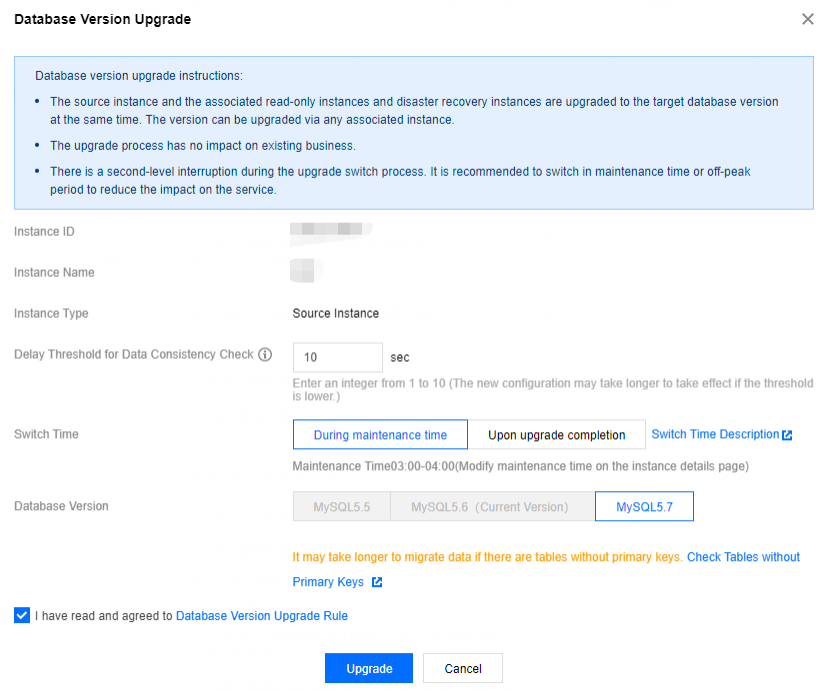
2. In the displayed dialog box, select Switch Time, and click Upgrade.
3. As database upgrade involves data migration, a momentary disconnection from the MySQL database may occur after the instance upgrade is completed. You can set the switch time to During maintenance time, so that the switch will be initiated within the next maintenance time after the upgrade.
Note:
When you select During maintenance time for Switch Time, the switch will not occur immediately after the database specification upgrade is completed; instead, the sync will continue till the instance goes into the next maintenance time when the switch will be performed. As a result, the overall time it takes to upgrade the instance may be extended.
FAQs
Will TencentDB for MySQL automatically back up data before upgrade?
TencentDB for MySQL adopts the daily real-time dual-server hot backup mechanism, which supports lossless restoration of data from the last 7–1830 days based on data backup and log backup (binlog).
Can TencentDB for MySQL be downgraded from MySQL 5.7 to MySQL 5.6?
No. Database engine downgrading is not supported. To use a MySQL 5.6 instance, you need to terminate or return the existing MySQL 5.7 instance, and then purchase a MySQL 5.6 instance.
Will there be a source-replica delay during upgrade?
Source instance upgrade requires data comparison and may cause a source-replica delay.
Will the instance switch after database engine version upgrade affect my TencentDB for MySQL instance?
The upgrade won't affect your business, but the TencentDB for MySQL instance may be disconnected for a few seconds. We recommend you configure an automatic reconnection feature for your application and conduct the switch during the instance maintenance time.
How long will it take to upgrade the database engine version of a TencentDB for MySQL instance? How do I check the upgrade progress?
The time it takes depends on the instance's data volume and the read requests to replicate data.
TencentDB for MySQL upgrade involves data migration and generally takes a relatively long time. Your business will not be affected during the upgrade and can be accessed as per usual.
Why is the instance always in the "Waiting for switch (after upgrade)" status?
It may be because you select During maintenance time for Switch Time, and the switch will be initiated within the next maintenance time after the upgrade.
To switch immediately, find the target instance in the instance list and click Switch Now in the Operation column. The switch will cause a momentary disconnection. Make sure that your business has a reconnection mechanism.
Help and Support
Was this page helpful?
You can also Contact sales or Submit a Ticket for help.
Help us improve! Rate your documentation experience in 5 mins.
Feedback