Backup FAQs
Download
Focus Mode
Font Size
FAQ: Backup Space Billing
FAQ: Database Backup
FAQ: Backup and Recovery
How Is Backup Space Billed?
TencentDB for MySQL provides a certain amount of free backup storage quota per region. The size of the free backup storage quota equals the sum of the storage space of all your two-node and three-node instances (including primary instances and disaster recovery instances) in that region.
The actual occupied space and the granted free space for single-node cloud disk instances are displayed separately. You can view them on the backup and recovery page for single-node cloud disk instances.

How to Reduce Backup Space Costs
Delete manual backup data that is no longer in use. (Manual backups can be deleted on the instance management page > backup and recovery page in the MySQL console.)
Reduce the frequency of automatic data backups for non-core services. (You can adjust the backup cycle and backup retention period in the console. Backups must be performed at least twice a week.)
Note:
The data rollback feature relies on data backups + log backups (binlog) within the backup cycle and backup retention period. Reducing the automatic backup frequency and retention period will affect the rollback time range for instance data. Please weigh your backup configuration accordingly.
Reduce the retention period for data backups and log backups of non-core services. (A backup retention period of 7 days is sufficient for most scenarios.)
Enable backup cold storage by customizing a backup cold storage policy and converting the storage type of backup files to reduce storage costs.
Business Scenario | Backup Retention Period |
Core businesses | Recommended retention period: 7 to 3650 days. Enable scheduled backups to achieve long-term preservation of backups on a regular basis. |
Non-core and non-data businesses | Recommended: 7 days |
Archiving businesses | Set the backup retention period to 7 days. Manually back up data based on actual business needs and delete it promptly after use. |
Testing businesses | Set the backup retention period to 7 days. Manually back up data based on actual business needs and delete it promptly after use. |
How to Set Up Automatic Backup
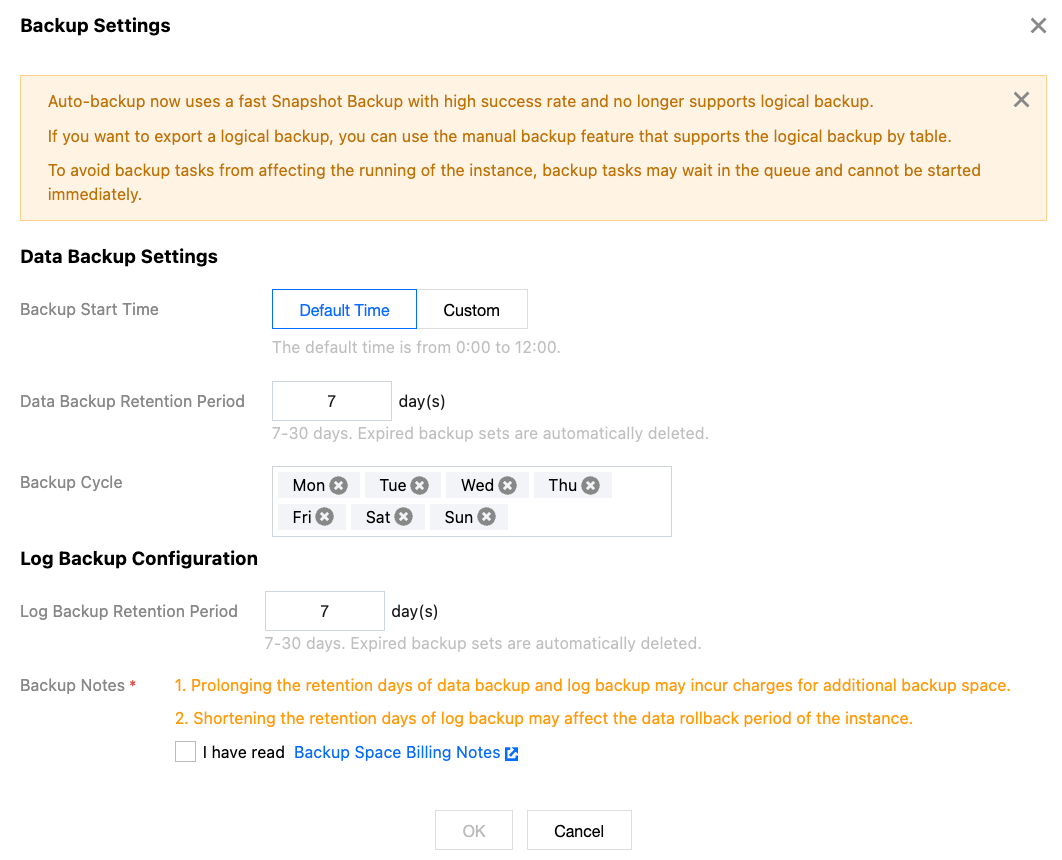
Why Are Some Time Periods Not Selectable When I Specify a Custom Backup Start Time?
The available backup start times may be limited by system scheduling resources. If certain time periods are not selectable, the backup queue for that time period is full. If this issue arises, it is recommended to select an idle time period to complete the settings.
How Can Developers Back Up Data Themselves?
TencentDB for MySQL instances perform a full backup daily by default. For details, see Backup Methods. If you need to back up data temporarily, you can also do so using the following methods:
Back up data yourself using the mysqldump tool.
Back up data using third-party tools, such as Navicat Premium.
Log in to phpMyAdmin and back up data via the Export option in the top navigation bar.
How to Restore or Migrate a Single-Node Basic Instance Backup
Single-node basic instances only support snapshot backups. You can migrate data by referring to Command-Line Tool for Data Migration.
Why Do I Get an Error When Downloading a Data Backup File?
When downloading a backup using the command
wget -c 'backup file download URL' -O custom_filename.xb, ensure to enclose the download URL with two English single quotes ' to facilitate program recognition of the address and prevent errors.Can a Downloaded Backup Be Restored to Another TencentDB for MySQL Instance?
You can restore a downloaded backup file to another database. For detailed operations, see Restoring a Database Using a Logical Backup.
Can Backups Be Deleted Manually?
Automatic backups cannot be deleted manually. You can set a backup retention period, after which the backups are automatically deleted.
Manual backups can be manually deleted from the backup list. If not manually deleted, they are retained indefinitely.
1.1 Log in to the MySQL console, click the instance ID to go to the management page, and select the Backup and Recovery page.
1.2 In the backup list, click Delete in the Operation column to delete it.
How to Cancel a Backup Task
Backup tasks cannot be canceled.
How to Resolve Slow Backup Downloads
We recommend that you copy the download address on the backup and recovery page of the instance in the MySQL console, log in to a CVM (Linux) within the VPC where the cloud database resides, and use the wget command for high-speed private network downloads, which is more efficient.
wget command format: wget -c 'backup file download URL' -O custom_filename.xbCan Backups Exceeding the Retention Period Still Be Downloaded or Restored?
Expired backup sets are automatically deleted and cannot be downloaded or restored.
We recommend that you reasonably set the backup retention period based on your requirements, or download the backup file to your local machine from the MySQL console.
You can also manually back up instance data in the console. Manual backups are retained indefinitely.
Note:
Manual backups also consume backup space. Please use backup space judiciously to avoid incurring additional costs.
Can Data and Log Backups Be Disabled?
It cannot be disabled. However, you can reduce backup frequency and delete manual backup data that is no longer in use via the MySQL console to lower backup space consumption.
Why Can't I Initiate a Manual Backup Task?
Please verify the scheduled time of your automatic backup task. If a daily automatic backup is in progress on the instance, you cannot initiate a manual backup.
Why Can't I Perform Logical Backup and Download for Sharded Tables?
After the Backup New Version upgrade, a new compression algorithm has been adopted for both logical and physical backup features. Consequently, some download features are temporarily unavailable. You can perform logical backups for sharded tables using the Logical Backup > Specify Database/Table feature in manual backup, and you can also download that completed backup.
Why Does Unpacking the Downloaded Backup File with tar Fail?
Backup files in the new version cannot be unpacked and decompressed normally using the original tar tool due to the adoption of a new compression algorithm. You must use the xbstream and qpress tools for unpacking and decompression.
For detailed steps on unpacking and decompressing with xbstream and qpress, see Restoring Databases Using Physical Backup and Restoring Databases Using Logical Backup.
How to Download the xbstream and qpress Tools
xbstream is a subprogram of Percona's xtrabackup backup tool. To use xbstream, you must first install Percona's xtrabackup. You can install xtrabackup using either the yum installation or the binary installation method.
After qpress is downloaded, extract the qpress binary file using the tar command.
For specific installation methods for xtrabackup and qpress, see Restoring Databases Using Physical Backup.
Help and Support
Was this page helpful?
You can also Contact sales or Submit a Ticket for help.
Help us improve! Rate your documentation experience in 5 mins.
Feedback