tencent cloud

Cloud Virtual Machine

Release Notes and Announcements
Release Notes
Public Image Release Notes
Official End of Support Plan for the Operating System
Announcements
Product Introduction
CVM Overview
Strengths
Basic Concepts
Regions and Zones
Tutorial
Service Regions and Service Providers
Billing
Billing Overview
Billing Modes
Billing Items
Billing Mode Conversion Overview
Purchasing Instances
Configuration Adjustment Billing Guide
Overdue Payments
Getting Started
Purchasing a Customized Linux Instance
Purchasing a Customized Windows Instance
User Guide
Operation Guide Overview
Use Limits
Instances
Spot Instances
Reserved Instances
Images
Storage
Backup and Restoration
Network
Security
Passwords/Keys
Monitoring and Alarms
Ops Management
Convenience Features
Migrating a Server
Online Migration
Migration Consultation
Troubleshooting
CVM Login Failures
Windows Instance Login Failures
Linux Instance Login Failures
Other Login Failures
Instance Running Failures
Linux Instance Memory Failures
Network Failures
Use Cases
Suggestions on CVM Model Selection
Environment Building
Website Building
Application Building
Visual GUI Building
Uploading Local Files to CVM
Network Performance Test
Other Practical Tutorials
API Documentation
History
Introduction
API Category
Making API Requests
Region APIs
Instance APIs
Cloud Hosting Cluster APIs
Image APIs
Instance Launch Template APIs
Placement Group APIs
Key APIs
Security Group APIs
Network APIs
Data Types
Error Codes
Security and Compliance
CAM
Network
FAQs
Regions and Zones
Billing
Instances
Storage
Images
Server Migration
Network
Security
Operating Systems
Ops and Monitoring
CAM
NTP Service
Scenarios
Agreements
CVM Service Level Agreements
Red Hat Enterprise Linux Image Service Agreement
Public IP Service Level Agreement
Glossary

Managing Reserved Instances

PDF
Focus Mode
Font Size
Last updated: 2024-01-08 09:25:40

Overview

This document describes how to use RIs.

Prerequisites

You have already logged in to CVM console and are in the Reserved Instance page.

Directions

1. Creating RIs For more information, see Creating Reserved Instance.
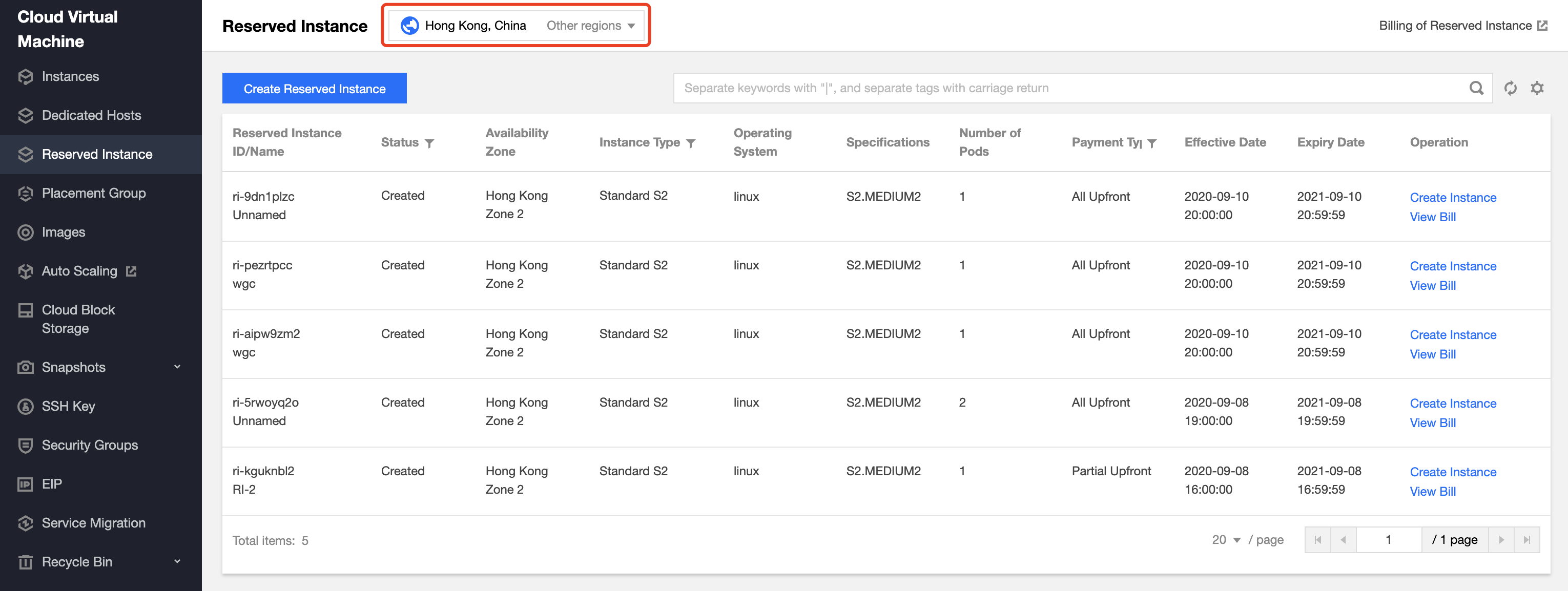
2. Viewing RIs

image-20200909170923152


Choose the region where the RI you want to view resides. On this page, you will see the following information: Reserved Instance ID/Name, Status, Region, Availability Zone, Instance Type, Specifications, Operating System, Number of RIs, Payment Type, Effective Date, and Expiry Date. You can also refer to Reserved Instance Billing Mode and Overview for RI attributes.
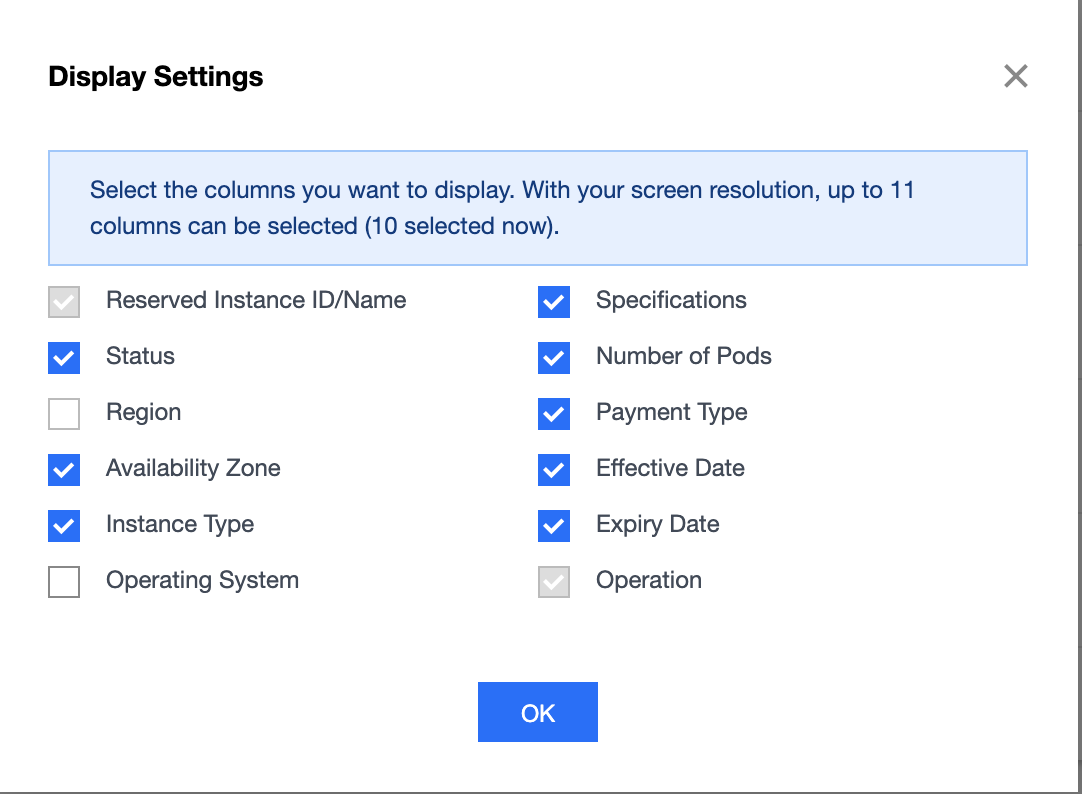
You can click

in the upper right corner to select the displayed fields in the pop-up Display Settings window, as shown below:

image-20200909171309547


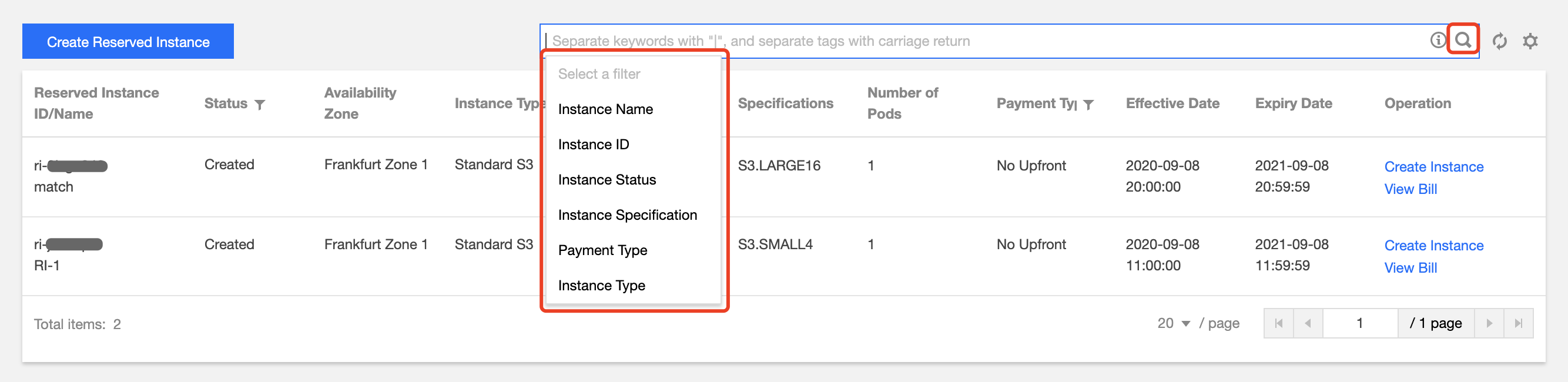
3. Searching RIs You can search for Rls by instance ID, RI name, status, instance type, specification, and payment type. To search for an RI, enter keywords in the search box and click

. Alternatively, you can first select a filter (such as instance ID), enter keywords, and click

, as shown below.

image-20200909171518516


4. Checking RI discounts Click View Bill to see the discount details of the selected RI.

image-20200909171551208


5. Creating CVM instances from RI For more information, see Creating CVM Instances from Reserved Instance.

Help and Support

Was this page helpful?

Help us improve! Rate your documentation experience in 5 mins.

Feedback