tencent cloud

Cloud Virtual Machine

Release Notes and Announcements
Release Notes
Public Image Release Notes
Official End of Support Plan for the Operating System
Announcements
Product Introduction
CVM Overview
Strengths
Basic Concepts
Regions and Zones
Tutorial
Service Regions and Service Providers
Billing
Billing Overview
Billing Modes
Billing Items
Billing Mode Conversion Overview
Purchasing Instances
Configuration Adjustment Billing Guide
Overdue Payments
Getting Started
Purchasing a Customized Linux Instance
Purchasing a Customized Windows Instance
User Guide
Operation Guide Overview
Use Limits
Instances
Spot Instances
Reserved Instances
Images
Storage
Backup and Restoration
Network
Security
Passwords/Keys
Monitoring and Alarms
Ops Management
Convenience Features
Migrating a Server
Online Migration
Migration Consultation
Troubleshooting
CVM Login Failures
Windows Instance Login Failures
Linux Instance Login Failures
Other Login Failures
Instance Running Failures
Linux Instance Memory Failures
Network Failures
Use Cases
Suggestions on CVM Model Selection
Environment Building
Website Building
Application Building
Visual GUI Building
Uploading Local Files to CVM
Network Performance Test
Other Practical Tutorials
API Documentation
History
Introduction
API Category
Making API Requests
Region APIs
Instance APIs
Cloud Hosting Cluster APIs
Image APIs
Instance Launch Template APIs
Placement Group APIs
Key APIs
Security Group APIs
Network APIs
Data Types
Error Codes
Security and Compliance
CAM
Network
FAQs
Regions and Zones
Billing
Instances
Storage
Images
Server Migration
Network
Security
Operating Systems
Ops and Monitoring
CAM
NTP Service
Scenarios
Agreements
CVM Service Level Agreements
Red Hat Enterprise Linux Image Service Agreement
Public IP Service Level Agreement
Glossary

Network Environment

PDF
聚焦模式
字号
最后更新时间: 2024-01-08 09:12:28
Tencent Cloud provides two network environments, Virtual Private Cloud (VPC) and classic network. For Tencent Cloud accounts created after June 13, 2017, only VPC is available. We recommend you use a VPC for the following reasons:
Complete features: VPC covers all classic network features, while providing more flexible network services such as custom IP range, routing, Direct Connect, VPN, NAT, etc.
Smooth migration: There is no completely smooth migration solution in the industry (the need to shut down, change private IP, etc). If you need to use a VPC for business development later, the migration process may affect your business.

VPC and Classic Network

VPC

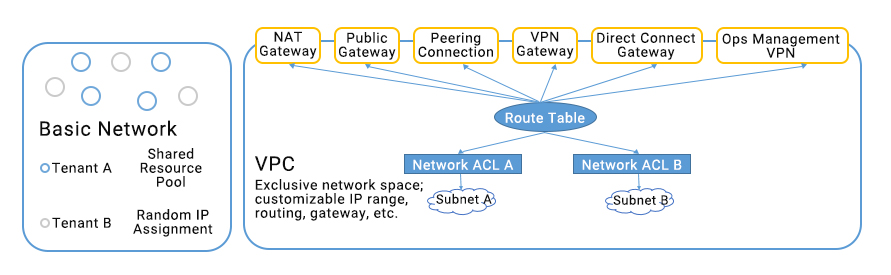
With Tencent Cloud’s Virtual Private Cloud (VPC), you can customize a logical isolated virtual network on the cloud. Even in the same region, different VPCs cannot communicate with each other by default. Similar to the traditional network that you run in your data center, your Tencent Cloud resources, including CVM, Cloud Load Balancer, and TencentDB for MySQL, are hosted on Tencent Cloud’s VPC to give you full control over the environment. For more information on configuration and application scenarios, see VPC. The VPC helps you build more complex network architecture and is suitable for those who are familiar with network management.


Classic network

Classic network is the public network resource pool for all Tencent Cloud users. All your Tencent Cloud resources will be centrally managed by Tencent Cloud.

Feature differences

Feature
Classic Network
VPC
Tenant association
Tenant association
Logical isolated network based on GRE encapsulation
Network customization
Not Supported
Supported
Routing customization
Not Supported
Supported
Custom IP
Not Supported
Supported
Interconnection rules
Interconnection is allowed for the same tenant in the same region
Cross-region and cross-account interconnection are supported
Security control

Sharing Between Classic Network and VPC

Some Tencent Cloud resources and features support both the classic network and VPC, and can be shared or accessed via the two different networks.
Resource
Description
An image can be used to launch a CVM instance in any network environment
Elastic Public IPs can bind to a CVM instance under any network environment
Instances
Instances in the classic network and VPC can communicate with each other through the Public IP or Classiclink
SSH key supports loading a CVM instance under any network environment
Security groups support binding CVM instances under any network environment
Note:
A Cloud Load Balancer can not work on both the classic network and VPC, even if the VPC and the classic network are interconnected.

Migrating from Classic Network to VPC

Please see Switch to VPC to migrate instances in the classic network to VPC.

帮助和支持

本页内容是否解决了您的问题?

填写满意度调查问卷,共创更好文档体验。

文档反馈