By enabling versioning, you can store multiple versions of an object in the same bucket. For example, you can store multiple objects with the same object key “picture.jpg” in one bucket, but the objects have different version IDs such as 100000, 100101, and 120002. You can query, delete, or restore the objects by version ID. Versioning enables you to recover from data loss caused by accidental deletion or application failure. Versioning is ideal for the following scenarios:
If you need to delete objects (not permanently) in a versioning-enabled bucket, COS will insert delete markers for the deleted objects, and the markers will serve as the current object versions. You can restore an object to its previous version by the delete marker.
COS will insert new version IDs for new objects you upload to replace existing ones, which you can restore by version ID.
Versioning States
There are three versioning states for a bucket:
Versioning not enabled: Bucket versioning is not enabled by default.
Versioning enabled: When bucket versioning is enabled, it will be applied to all the objects in the bucket. After versioning is enabled for the first time, objects uploaded to the bucket thereafter will be assigned a unique version ID.
Versioning suspended: Once the versioning state is changed from enabled to suspended (versioning cannot be disabled once enabled), objects uploaded to the bucket thereafter will no longer be subject to versioning.
Note:
1. Once versioning is enabled for the bucket, it cannot return to the prior status (initial status). However, you can suspend versioning for the bucket so that subsequent uploads of objects will not generate multiple versions.
2. For objects existing in the bucket before versioning is enabled, the version ID is "null".
3. Enabling or suspending versioning will change the way COS makes requests when handling the objects but not the objects themselves.
4. Only the root account and authorized sub-accounts can suspend versioning for a bucket.
Managing Objects in Buckets with Different Versioning States
You can upload, query, and delete objects in a bucket no matter what the versioning state is. When versioning is enabled or suspended, you can query and delete objects with or without version IDs.
If versioning is not enabled, you can upload, query, and delete objects in the same way as in an ordinary bucket. For more information, see Object Management.
If versioning is enabled or suspended, you can specify version IDs while uploading, querying or deleting objects. Delete markers will be added to deleted objects.
Managing objects in a versioning-enabled bucket
For objects in the bucket before versioning is enabled, their version ID will be “null”. Enabling versioning will change the way COS handles the objects, such as how COS makes requests, but not the objects themselves. Objects with the same name uploaded thereafter will be stored in the same bucket with different version IDs. You can manage objects in a bucket with versioning enabled as described below:
Note:
An object is uploaded to both buckets with versioning enabled and not enabled in the same way, but with different version IDs. If versioning is enabled, COS will assign a unique version ID to any object uploaded to the bucket; if versioning is not enabled, the version ID will remain null.
Uploading an object
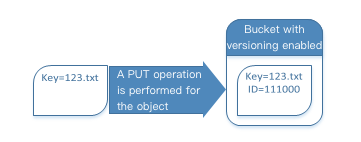
If versioning is enabled for a bucket, when you perform PUT, POST, and COPY operations, COS will automatically assign a unique version ID to the objects added to the bucket.
As you can see below, when an object is uploaded to a bucket with versioning enabled, COS will assign it a unique version ID.
Listing versioned objects
COS stores object version information in the versions parameter associated with the bucket and returns object versions in the order of storage time from the newest to the oldest.
Querying all versions of a specific object
You can query all versions of a particular object using the versions parameter together with the prefix request parameter. For more information on prefix, see GET Bucket Object Versions.
Below is a sample request for getting all versions of a specific object:
GET /?versions&prefix=ObjectKey HTTP/1.1
Querying an object version
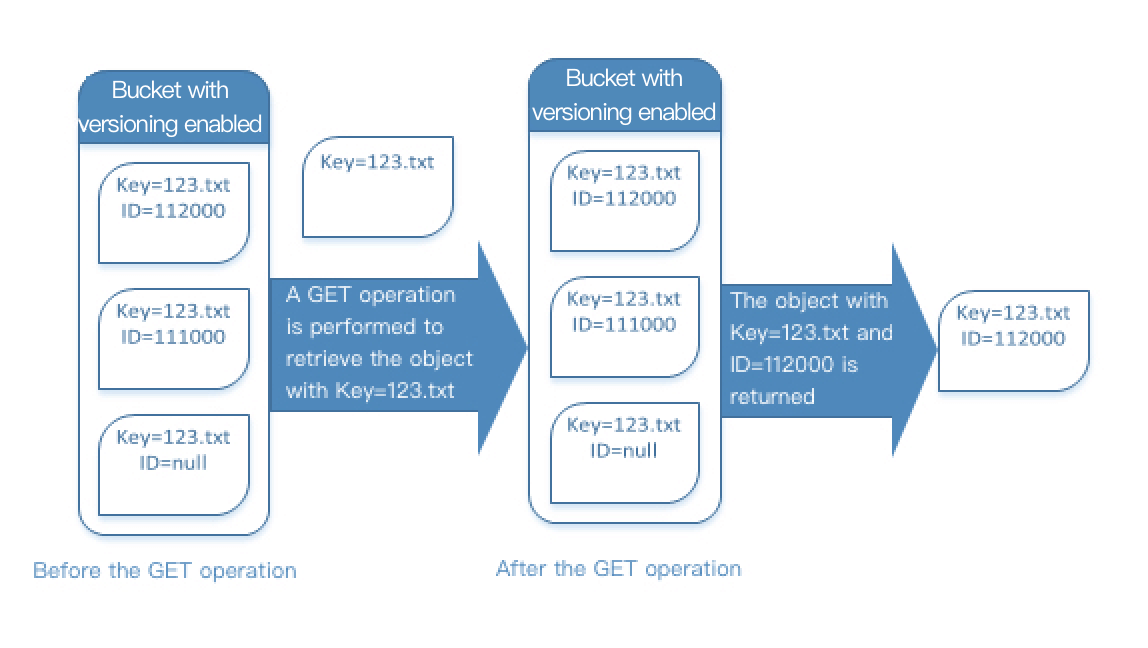
A GET request with no version ID specified returns the current version of an object. The following figure shows how a GET request returns the current version (the latest version) of the 123.txt object.
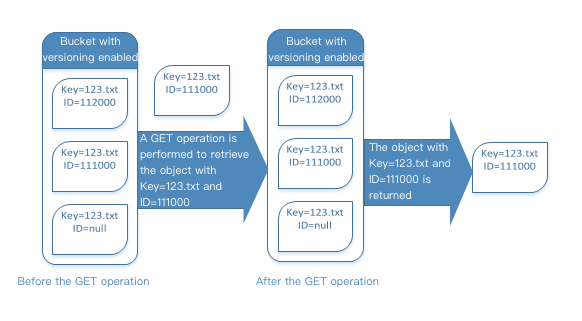
A GET request with a version ID specified returns the specified version of an object. The following figure shows how such a request returns the specified version of the object. The request can also return the current version.
Querying the metadata of an object version
If you only want to query the metadata of an object instead of its content, use the HEAD operation. By default, you get the metadata of the latest version. To query the metadata of a specific object version, specify its version ID when submitting the request.
To query the metadata of an object version:
Set the version ID to the ID of the version of the object whose metadata you want to query.
Send a HEAD operation request with the version ID specified.
Deleting objects
You can delete unnecessary object versions. When you make a DELETE request in a versioning-enabled bucket, there will be two scenarios:
1. Perform a simple DELETE operation with no version ID specified.
This is similar to putting the deleted objects to the "recycle bin". The objects are not permanently deleted and can be restored if needed.
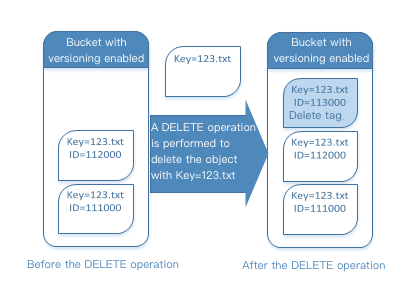
As you can see below, if you do not specify a version ID, the DELETE operation will not delete the 123.txt object; instead, it will insert a delete marker and add a new version ID.
Note:
COS will insert a delete marker with a new version ID for the deleted objects. The delete marker will become the current version of the deleted objects. When you try to GET the objects with a delete marker, COS will assume that the objects do not exist and will return a 404 error.
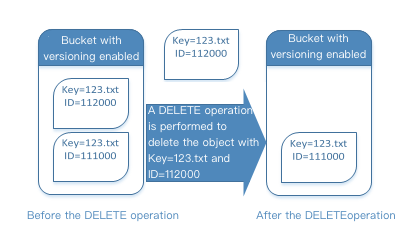
2. If you delete an object with a version ID specified, the specified version of the object will be deleted permanently.
Restoring Previous Versions
Versioning can be used to restore previous versions. You can do it in two ways:
1. Copy a previous version of the object into the same bucket
The copied object will become the current version of the object, and all object versions will be retained
2. Delete the current version of the object permanently
When you delete the current object version, you, in effect, turn the previous version into the current version of the object.
Managing objects in a versioning-suspended bucket
When you suspend versioning, existing objects in your bucket do not change. What changes is how COS handles objects in future requests. The section below describes how to manage objects in a bucket where versioning is suspended.
Uploading an object
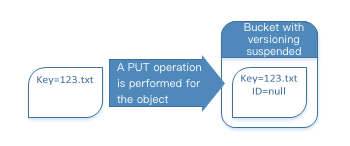
Once you suspend bucket versioning, when you use PUT, POST, or COPY operations, COS will automatically add a “null” version ID to objects added to the bucket thereafter as shown below:
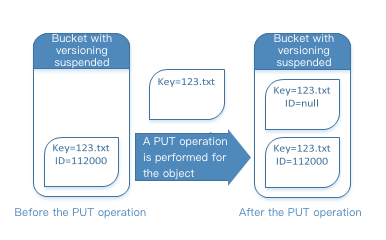
If there are versioned objects in the bucket, the objects newly uploaded to the bucket will become the current version with a version ID of null as shown below:
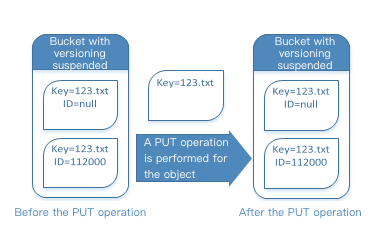
If there is already a null version in the bucket, it will be overwritten, and the original object content will also be replaced accordingly as shown below:
Querying an object version
A GET Object request in a versioning-suspended bucket returns the current version of an object.
Deleting objects
If versioning is suspended, a DELETE request will result in one of the following:
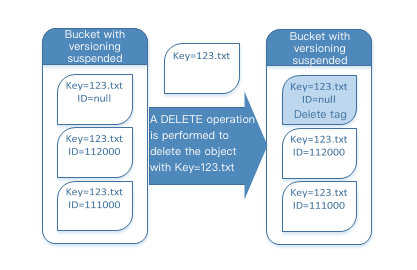
If an object has a null version in the bucket, the null version of the object will be deleted.
As you can see below, when you use a simple DELETE operation, COS will insert a delete marker for objects with a version ID of null.
Note:
Since a delete marker does not have content, you will lose the original content of the null version when a delete marker replaces it.
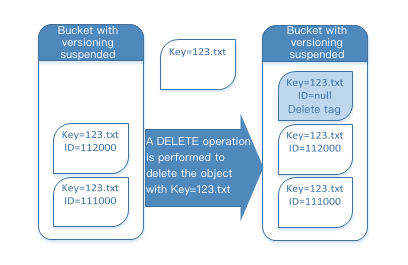
If an object does not have a null version in the bucket, a new delete marker will be added to the bucket.
As you can see below, if an object does not have a null version in the bucket, a simple DELETE will not remove anything; COS will just insert a delete marker.
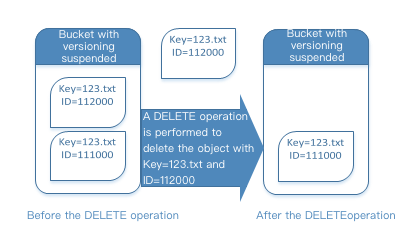
Even in a bucket where versioning is suspended, the root account is still able to delete a specified version permanently.
The following figure shows that deleting a specified object version will delete the object permanently.
Note:
Only the root account or an account authorized by it can delete a specified object version.