MAZ Feature Overview
Download
Focus Mode
Font Size
Introduction
Multi-AZ (Multiple Availability Zones) is a storage architecture introduced by Tencent Cloud COS. This architecture distributes customer data across multiple distinct data centers within a city. Even if an entire data center fails due to extreme events such as natural disasters or power outages, it can still provide customers with stable and reliable storage services. Multi-AZ storage offers 99.9999999999% (12 nines) of designed data durability and up to 99.995% of designed service availability. When users upload data, they only need to specify the storage class for the object to store it in a Multi-AZ region.
Note:
Currently, Multi-AZ buckets can only be created in the Beijing, Guangzhou, Shanghai, Hong Kong (China), Singapore, and Shanghai Finance regions. Support for other regions will be rolled out subsequently.
Multi-AZ storage incurs higher storage usage fees than single-AZ storage. For details, see the Product Pricing for each region.
Once you enable the Multi-AZ configuration for a bucket, you cannot disable it.
Use Cases
The Multi-AZ storage architecture provides data center-level disaster recovery capabilities. The following are several use cases for Multi-AZ storage:
Disaster Recovery: In the event of unpredictable natural disasters such as earthquakes or floods, Multi-AZ storage can automatically back up and restore data across geographically dispersed data centers, thereby reducing losses caused by the disaster.
High-Availability Applications: For internet services that require high availability, such as e-commerce platforms, online games, and social networks, Multi-AZ storage can provide more stable service. Even if a problem occurs at one data center, it can quickly switch to another data center, ensuring a good user experience.
Critical Business Data Protection: For industries with high requirements for data security and business continuity, such as finance, healthcare, and government, Multi-AZ storage can ensure that data remains secure and business operations continue uninterrupted at other data centers when a failure occurs at one data center.
Description
When you store data in a Multi-AZ region, the data is split into several data blocks. Corresponding parity blocks are also calculated based on the erasure coding algorithm. The original data blocks and parity blocks are then distributed and evenly stored across different data centers within that region, achieving intra-city disaster recovery. If a data center becomes unavailable, data at the other data centers can still be read from and written to normally. This ensures persistent storage of customer data without loss and maintains business data continuity and high availability. Using Multi-AZ COS offers the following advantages:
Intra-City Disaster Recovery: It provides disaster recovery across data centers. Under the Multi-AZ storage architecture, object data is stored across different devices in different data centers within the same region. When a data center fails, the redundant data centers remain available, user business is unaffected, and data is not lost.
Stable and Durable: It uses erasure coding for redundant storage, providing up to 99.9999999999% of designed data reliability. It also stores data in blocks and supports concurrent read and write operations, delivering up to 99.995% of designed service availability.
Easy to Use: You can specify the storage architecture for your data by selecting the COS storage class. You can store any object in a bucket to the Multi-AZ architecture, making usage simpler.
How It Works
AZ is the abbreviation for availability zone (AZ). It refers to a region provided by a cloud service that is physically isolated and has independent power and network resources. Multiple AZs are independent of each other. Therefore, deploying across AZs can improve service availability and disaster recovery capabilities.
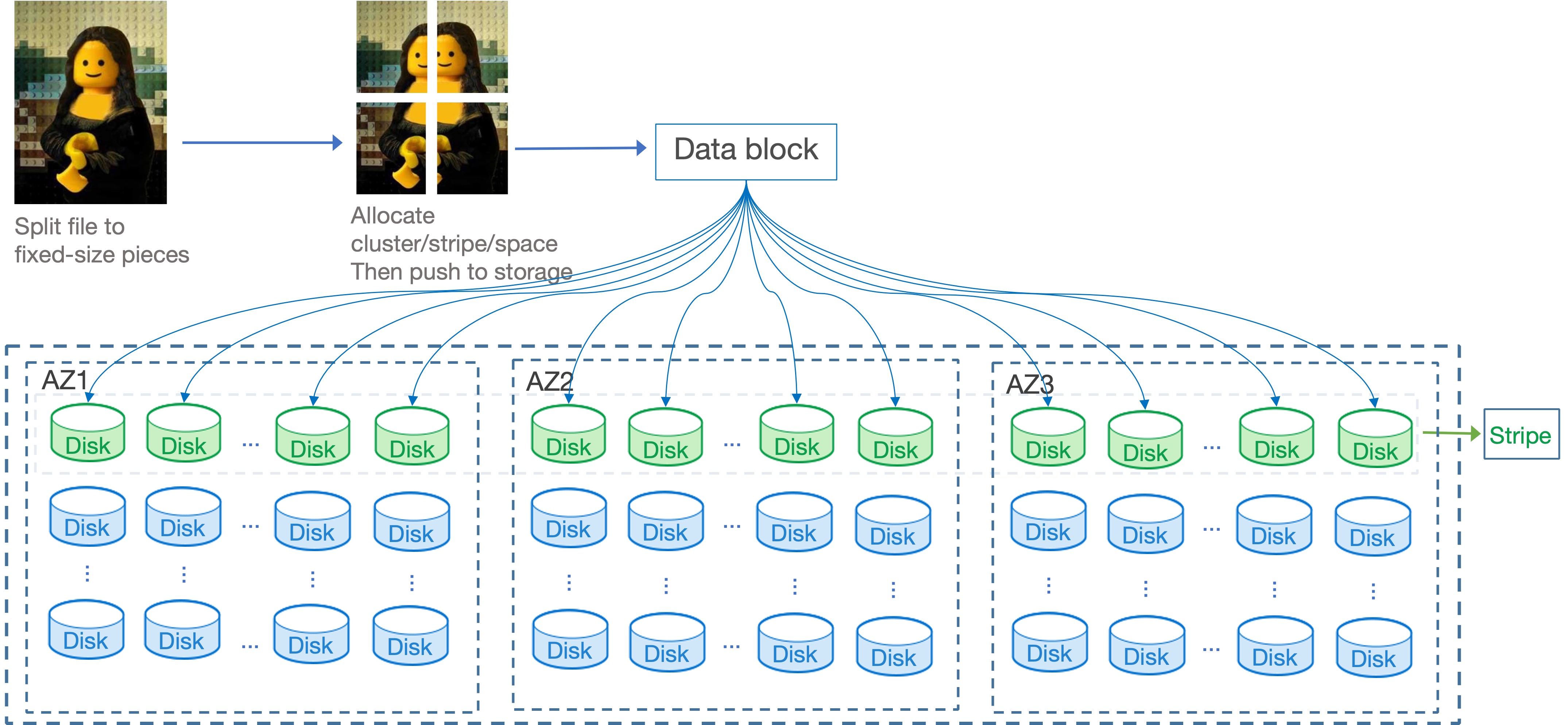
For Multi-AZ storage, the COS storage engine is deployed across three physically isolated AZs. Data uploaded by users is sliced and stored across multiple nodes in these three AZs. Based on the EC erasure coding algorithm, the original data is split into N data blocks. The algorithm then generates M parity blocks, resulting in multiple storage fragments. COS distributes these storage fragments across different rack servers in the three AZs, thereby implementing Multi-AZ storage.
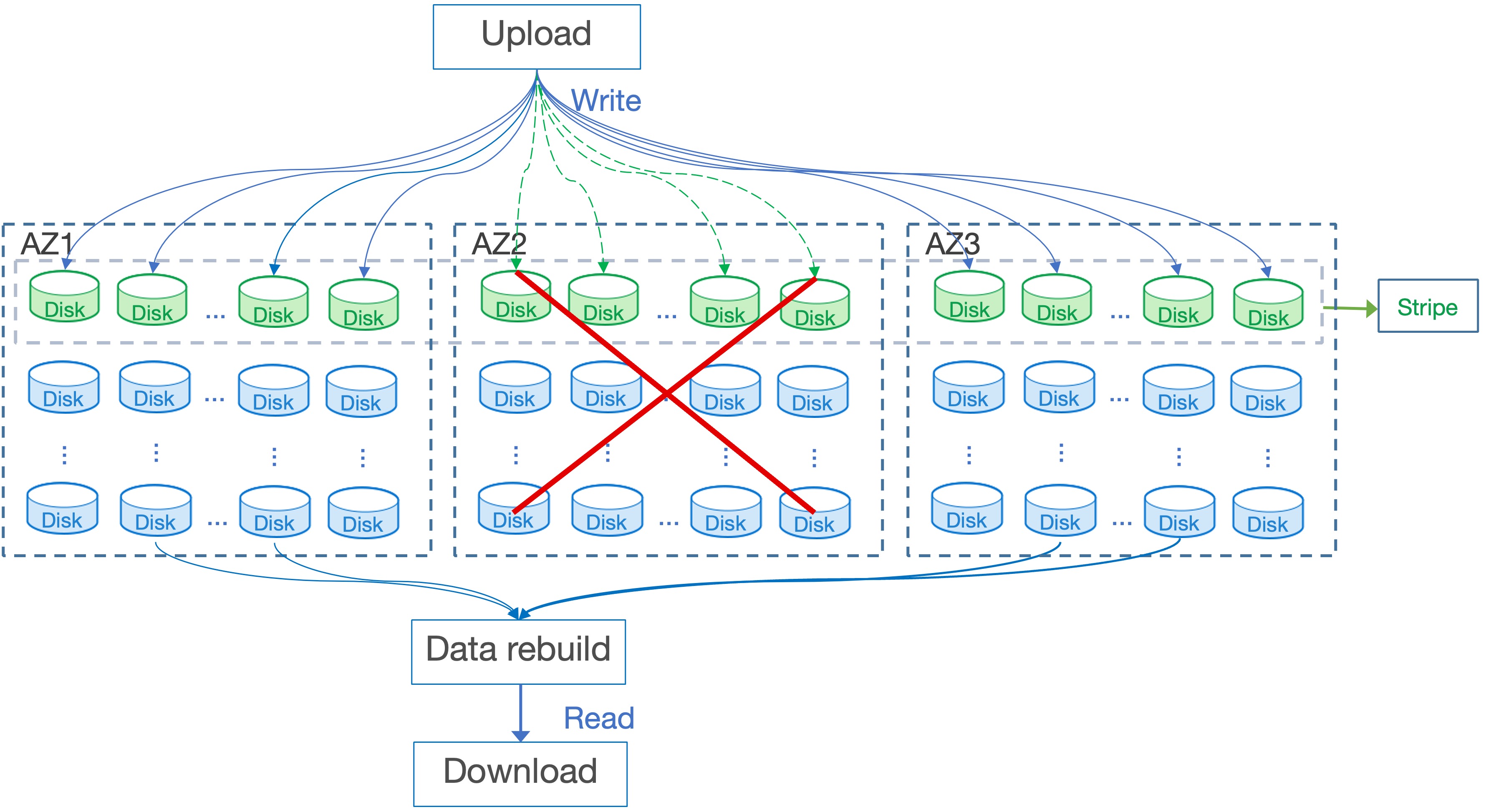
When a data center failure causes damage to some nodes or AZs, making some fragments unavailable, Multi-AZ storage can still use other fragments from the backup AZs to ensure successful user data reads and writes. This guarantees uninterrupted customer business continuity.
Comparison of Multi-AZ Storage and Single-AZ Storage
A comparison of Multi-AZ storage and Single-AZ storage regarding data durability, service availability, region, storage class, as well as some feature limitations, is shown in the table below.
Comparison Item | Multi-AZ Storage | Single-AZ Storage | Documentation | |
Data durability | | 99.9999999999% (12 nines) | 99.999999999% (11 nines) | - |
Service availability | | Up to 99.995% | Up to 99.99% | - |
Region | | Currently supported only in Beijing, Shanghai, Guangzhou, Hong Kong (China), Singapore, and Shanghai Finance. | All regions | - |
Storage type | | MAZ_STANDARD MAZ_STANDARD_IA MAZ_ARCHIVE MAZ_INTELLIGENT_TIERING | STANDARD STANDARD_IA ARCHIVE DEEP_ARCHIVE INTELLIGENT_TIERING | |
Functional Limitations | Versioning | Pausing is not supported after versioning is enabled. | Pausing is supported after versioning is enabled. | |
| Recycle Bin | Pausing is not supported after the recycle bin is enabled. | Pausing is supported after the recycle bin is enabled. | - |
| Object Lock | Object Lock is not currently supported. | Object Lock is supported and currently available only to allowlist customers. | |
| Batch Operations | Batch restoration of archived objects is not currently supported. | Batch data copy, batch restoration of archived objects, and batch deletion. | |
| Select | Not supported. | Supported | |
| API | Uploading/downloading objects using the JSON API is not supported. Upgrade to the XML API. | Both XML API and JSON API are supported. XML API is recommended. | |
Usage
You can enable Multi-AZ configuration for a bucket. When you upload an object to a bucket with Multi-AZ enabled, you can set the object's storage class to Multi-AZ. By specifying the storage class during upload, you can store the object in the Multi-AZ storage architecture.
In short, you only need to perform the following two steps to store files in the Multi-AZ architecture:
1. Create a bucket and enable Multi-AZ configuration during creation. For instructions on creating a bucket, refer to the Create a Bucket document.
2. Upload the file and specify its storage class during the upload. For instructions on uploading files, refer to the Upload Objects document.
Note:
Once Multi-AZ configuration is enabled for a bucket, it cannot be modified. Please configure it carefully. Existing buckets do not have Multi-AZ enabled by default. Only newly created buckets can have Multi-AZ enabled.
If you want to store existing data in a Multi-AZ bucket, you can create a new bucket with Multi-AZ enabled and use the batch copy feature of COS Batch to copy files from the existing bucket to the new bucket in batches. For instructions on using COS Batch, refer to the Batch Operations document.
Help and Support
Was this page helpful?
You can also Contact sales or Submit a Ticket for help.
Help us improve! Rate your documentation experience in 5 mins.
Feedback